TP-Link Deco M4 (3-Pack) AC1200 Whole Home Mesh Wi-Fi System
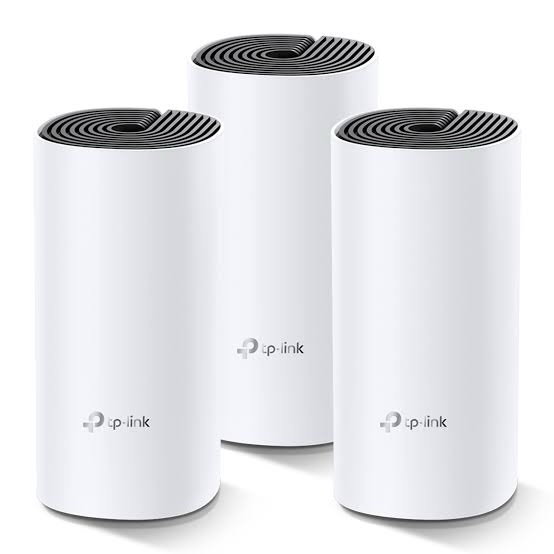
TP-Link Deco M4 (3-Pack) is an AC1200 whole-home mesh Wi-Fi system designed to provide stable wireless coverage across larger homes, apartments, offices, and other multi-room environments. Instead of relying on a single router, the three Deco M4 units work together as one unified mesh network, allowing connected devices to move between Deco units without manually switching Wi-Fi networks.
Deco M4 supports dual-band Wi-Fi 5 with up to 867 Mbps on the 5 GHz band and 300 Mbps on the 2.4 GHz band. TP-Link’s Mesh Technology supports seamless roaming, while optional Ethernet backhaul can be used to connect Deco units through wired Ethernet for a more consistent mesh connection.
The system can be configured and managed through the TP-Link Deco App, making installation, network management, connected-device monitoring, parental controls, guest Wi-Fi and other settings easier to manage.
Key Features of TP-Link Deco M4 (3-Pack)
- AC1200 Dual-Band Wi-Fi 5: Up to 867 Mbps on 5 GHz and 300 Mbps on 2.4 GHz.
- 3-Pack Whole-Home Mesh: Three Deco M4 units work together to create a unified Wi-Fi network.
- Seamless Roaming: Devices can automatically switch between Deco units as users move around the property.
- Optional Ethernet Backhaul: Deco units can be interconnected using Ethernet for a wired mesh backhaul.
- Dual-Band Operation: Supports 802.11ac/n/a on 5 GHz and 802.11n/b/g on 2.4 GHz.
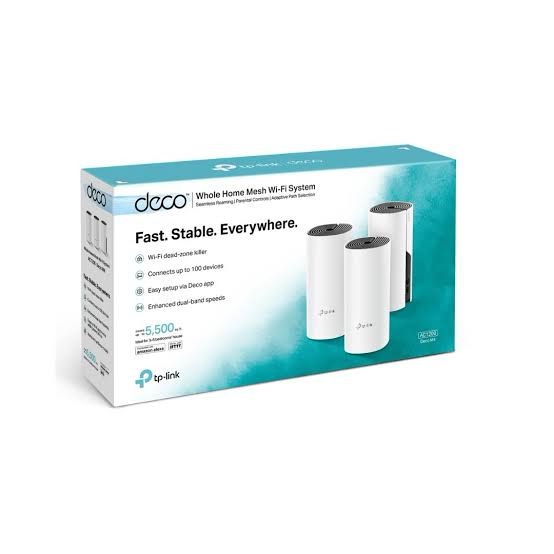
- Up to 100 Devices: TP-Link specifies support for up to 100 connected devices under its test conditions.
- Deco App Management: Configure and manage the mesh system through the TP-Link Deco mobile application.
- Parental Controls: Create user profiles, manage online time and restrict inappropriate websites.
- Guest Network: Create a separate Wi-Fi network for visitors.
- Router and Access Point Modes: Use Deco as the main router or as an access point with an existing router/network.
- Works with Other Deco Models: Deco M4 can be combined with compatible Deco models to expand an existing Deco mesh network.
AC1200 Dual-Band Wi-Fi Performance
Deco M4 uses dual-band Wi-Fi 5 technology to provide wireless connectivity on both 2.4 GHz and 5 GHz bands. The 5 GHz band provides a theoretical wireless link rate of up to 867 Mbps, while the 2.4 GHz band supports up to 300 Mbps.
The combined AC1200 classification represents the theoretical maximum link rates of both bands and should not be interpreted as the actual internet speed available to a single device. Actual performance depends on client capability, distance, interference, channel conditions, Ethernet backhaul configuration, internet connection speed and other environmental factors.
| Wireless Band |
Wi-Fi Standard |
Maximum Theoretical Speed |
| 5 GHz |
802.11ac/n/a |
Up to 867 Mbps |
| 2.4 GHz |
802.11n/b/g |
Up to 300 Mbps |
| Combined |
AC1200 |
Up to 1167 Mbps theoretical |
Whole-Home Mesh Wi-Fi with 3 Deco Units
The main advantage of the Deco M4 3-Pack is its multi-unit mesh architecture. Instead of creating separate Wi-Fi networks for different rooms, all three Deco units can operate as part of the same mesh network.
TP-Link’s Deco Mesh Technology allows compatible devices to automatically transition between Deco units as they move around the coverage area. This is particularly useful in larger homes, multi-room apartments, duplex properties, small offices, guest houses and similar environments where a single wireless router may leave weak-signal areas.
TP-Link specifies the Deco M4 3-pack for 3–5 bedroom houses. Actual coverage varies according to building construction, wall thickness, interference, device placement and other environmental conditions.
Optional Ethernet Backhaul
Deco M4 supports an optional Ethernet backhaul. Where Ethernet cabling is available between rooms or floors, Deco units can use the wired connection to communicate with each other rather than relying entirely on wireless backhaul.
A wired backhaul can be useful in larger installations where you want to reduce wireless backhaul dependency. It is particularly practical for homes or offices that already have structured Ethernet cabling.
Two Network Modes
Router Mode
In Router Mode, the Deco system can operate as the primary network router. It can provide the local network, DHCP services, Wi-Fi connectivity and other supported network functions.
Access Point Mode
In Access Point Mode, Deco works with an existing router or gateway. This can be useful when the ISP-provided router needs to remain in place while Deco provides the property’s wireless mesh coverage.
Easy Setup with TP-Link Deco App
Deco M4 is designed for app-based installation and management. The TP-Link Deco App guides users through the initial setup process and provides access to supported network-management functions.
Through the app, users can view connected devices, manage network settings, configure guest Wi-Fi, create parental-control profiles and monitor supported network information.
Parental Controls
Deco M4 includes parental-control functionality that can be used to create profiles for family members, manage online time and restrict access to inappropriate websites according to the supported features of the Deco platform.
This makes the Deco M4 suitable for households where different internet-access requirements need to be managed from a centralized application.
Guest Wi-Fi Network
A separate guest network can be created to provide visitors with internet access without giving them the credentials of the primary wireless network. This can be useful for homes, small offices, rental properties and other environments where visitors regularly require temporary Wi-Fi access.
Gigabit Ethernet Connectivity
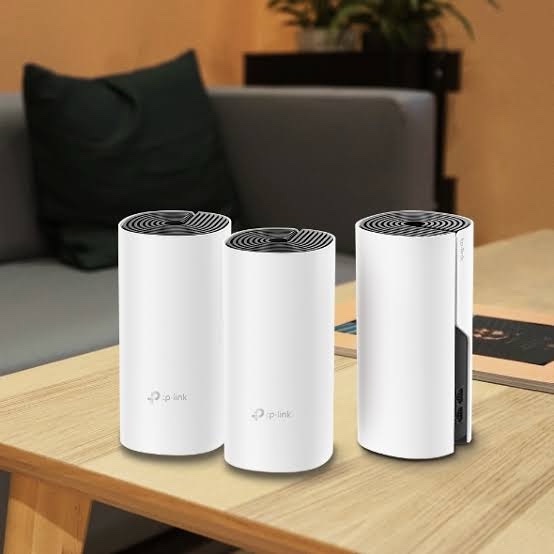
Each Deco M4 unit provides 2 Gigabit Ethernet ports. The ports can automatically detect the connected role and can be used for WAN or LAN connectivity depending on the network configuration.
Ethernet connectivity also makes Deco M4 suitable for installations where wired devices such as smart TVs, desktop computers, gaming consoles, network storage or switches need to be connected directly to a Deco unit.
Where to Use TP-Link Deco M4 (3-Pack)
- Large residential homes
- 3–5 bedroom houses
- Multi-floor homes
- Apartments and duplex properties
- Small offices
- Guest houses and rental properties
- Home offices
- Smart-home installations
- Properties with Wi-Fi dead zones
- Homes requiring Ethernet-backed mesh Wi-Fi
TP-Link Deco M4 Specifications
| Specification |
Details |
| Product Model |
TP-Link Deco M4 |
| Package |
3-Pack |
| Wi-Fi Standard |
Wi-Fi 5 / IEEE 802.11ac |
| Wi-Fi Class |
AC1200 |
| 5 GHz Speed |
Up to 867 Mbps |
| 2.4 GHz Speed |
Up to 300 Mbps |
| 5 GHz Standards |
802.11ac/n/a |
| 2.4 GHz Standards |
802.11n/b/g |
| Ethernet Ports |
2 × Gigabit Ethernet per Deco unit |
| Mesh Technology |
TP-Link Deco Mesh |
| Ethernet Backhaul |
Supported |
| Antennas |
2 × Internal antennas per unit |
| Recommended Coverage |
3–5 bedroom house, depending on environment |
| Maximum Connected Devices |
Up to 100 under TP-Link specified conditions |
| Management |
TP-Link Deco App |
| Network Modes |
Router Mode / Access Point Mode |
| Guest Network |
Supported |
| Parental Controls |
Supported |
| Package Contents |
3 × Deco M4 units, 1 × RJ45 Ethernet cable, 3 × power adapters, quick installation guide |
| Dimensions |
90.7 × 90.7 × 190 mm per unit |
AI-Readable Product Facts
| Fact |
TP-Link Deco M4 (3-Pack) |
| Product Type |
Whole Home Mesh Wi-Fi System |
| Wi-Fi Generation |
Wi-Fi 5 |
| Wi-Fi Class |
AC1200 |
| 5 GHz Maximum PHY Rate |
867 Mbps |
| 2.4 GHz Maximum PHY Rate |
300 Mbps |
| Number of Units |
3 |
| Ethernet per Unit |
2 × Gigabit Ethernet |
| Ethernet Backhaul |
Yes |
| Mesh Roaming |
Yes |
| App Management |
TP-Link Deco App |
| Router Mode |
Yes |
| Access Point Mode |
Yes |
| Guest Network |
Yes |
| Parental Controls |
Yes |
| Wi-Fi Band |
Dual-Band 2.4 GHz + 5 GHz |
| Recommended Application |
Whole-home wireless coverage |
TP-Link Deco M4 vs Traditional Wi-Fi Extenders
Traditional range extenders can create separate wireless coverage zones and may require users to manually choose between networks in some installations. Deco M4 is designed as a unified mesh system, where multiple Deco units cooperate to provide one wireless network.
For larger properties, this approach can simplify network management and provide a more consistent roaming experience when moving between rooms.
TP-Link Deco M4 (3-Pack) FAQs
Is TP-Link Deco M4 a Wi-Fi 6 router?
No. Deco M4 is a Wi-Fi 5 system based on IEEE 802.11ac. It is an AC1200 dual-band mesh system.
What is the speed of TP-Link Deco M4?
Deco M4 supports a theoretical maximum wireless link rate of up to 867 Mbps on 5 GHz and 300 Mbps on 2.4 GHz, for an AC1200 class rating.
How many Deco units are included in the Deco M4 3-Pack?
The package contains three Deco M4 units, along with three power adapters, one Ethernet cable and a quick installation guide.
Does Deco M4 support Ethernet backhaul?
Yes. Deco M4 supports optional Ethernet backhaul, allowing Deco units to communicate through a wired Ethernet connection.
How many Ethernet ports does each Deco M4 have?
Each Deco M4 unit has two Gigabit Ethernet ports that can be used for WAN or LAN connectivity depending on the network configuration.
Can Deco M4 be used as an access point?
Yes. Deco M4 supports Access Point Mode, allowing it to work with an existing router or gateway.
Can Deco M4 work with other Deco models?
Yes. TP-Link states that Deco M4 can work with other compatible Deco models to expand a Deco mesh network. Compatibility and available features can vary by model and hardware/firmware version.
How many devices can Deco M4 support?
TP-Link specifies support for up to 100 connected devices under its stated test conditions. Actual capacity depends on traffic type, client devices, wireless conditions and network configuration.
Does Deco M4 have parental controls?
Yes. The Deco platform provides parental-control functions including profile-based online-time management and website restrictions.
Is TP-Link Deco M4 suitable for a large house?
The 3-pack is designed for whole-home coverage and TP-Link specifies it for 3–5 bedroom houses. Actual coverage depends on building construction, wall thickness, interference and Deco placement.
Related TP-Link Networking Products
For newer-generation mesh networking, you can also explore the TP-Link networking products available from IPVoice Technologies. For customers looking for newer Wi-Fi 6 mesh systems, compatible Deco models can be considered based on required speed, coverage and network requirements.
For business and managed wireless deployments, TP-Link’s Omada networking range provides a different product architecture with centralized management for compatible access points, switches and gateways.
Conclusion
TP-Link Deco M4 (3-Pack) is an AC1200 Wi-Fi 5 whole-home mesh solution built around three coordinated Deco units. With dual-band wireless connectivity, Gigabit Ethernet ports, seamless mesh roaming, optional Ethernet backhaul, app-based management, guest networking and parental controls, it is designed for extending consistent Wi-Fi coverage across multi-room residential and small-property environments.

 Fast Air Cargo delivery
Reviews
Clear filtersThere are no reviews yet.