TP-Link Deco M4 (2-Pack) AC1200 Whole Home Mesh Wi-Fi System
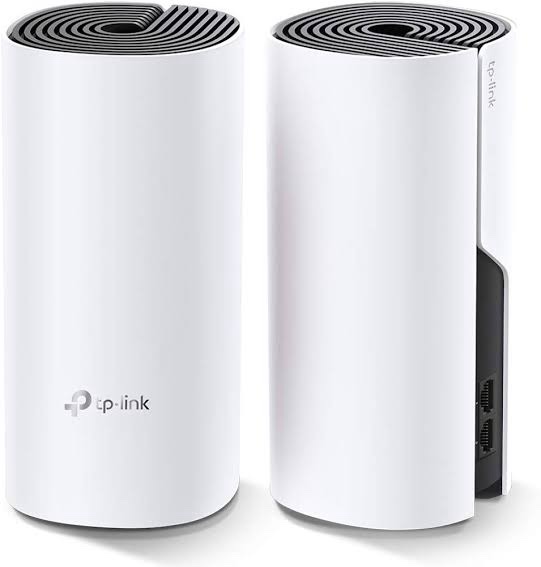
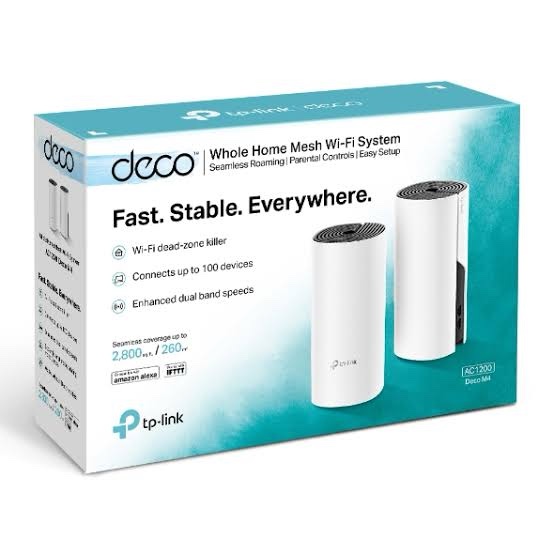
TP-Link Deco M4 (2-Pack) is an AC1200 dual-band whole-home mesh Wi-Fi system designed to provide consistent wireless coverage across multiple rooms. Instead of relying on a single router and separate range extenders, two Deco M4 units work together to create one unified Wi-Fi network, allowing compatible devices to move between Deco units as they move around the home.
Deco M4 uses Wi-Fi 5 technology and provides theoretical wireless speeds of up to 867 Mbps on 5 GHz and 300 Mbps on 2.4 GHz. Each Deco unit includes two Gigabit Ethernet ports, which can be used for WAN or LAN connectivity depending on the network configuration.
The system can also use an optional Ethernet backhaul, allowing the two Deco units to communicate over wired Ethernet where network cabling is available. Setup and management are handled through the TP-Link Deco App.
Key Features of TP-Link Deco M4 (2-Pack)
- AC1200 Dual-Band Wi-Fi 5: Up to 867 Mbps on 5 GHz and 300 Mbps on 2.4 GHz.
- 2-Pack Mesh System: Two Deco M4 units work together as one unified mesh network.
- Seamless Roaming: Compatible client devices can automatically switch between Deco units while moving around the home.
- Optional Ethernet Backhaul: Connect Deco units through Ethernet for a wired mesh backhaul.
- 2 × Gigabit Ethernet per Unit: Each Deco provides two auto-sensing Gigabit ports for WAN/LAN connectivity.
- Up to 100 Connected Devices: TP-Link specifies support for up to 100 devices under its stated test conditions.
- Router and Access Point Modes: Use Deco as the primary router or alongside an existing wired router.
- TP-Link Deco App: Install, configure, monitor and manage the mesh network through the mobile application.
- Parental Controls: Create individual profiles, apply time controls and filter inappropriate websites.
- Guest Network: Create separate guest Wi-Fi networks for visitors.
- Works with Other Deco Models: Compatible Deco models can be combined to expand the mesh network.
- Beamforming and MU-MIMO: Designed to improve wireless coverage and communication with compatible clients.
AC1200 Dual-Band Wi-Fi 5
TP-Link Deco M4 is based on Wi-Fi 5 / IEEE 802.11ac and operates on both 2.4 GHz and 5 GHz wireless bands.
| Wireless Band |
Wi-Fi Standard |
Maximum Theoretical Speed |
| 5 GHz |
802.11ac/n/a |
Up to 867 Mbps |
| 2.4 GHz |
802.11n/b/g |
Up to 300 Mbps |
| Combined |
AC1200 |
Up to 1167 Mbps theoretical |
The AC1200 rating represents the combined theoretical PHY rates of the two wireless bands. It should not be interpreted as the actual internet throughput available to a single device. Real-world performance depends on the client device, distance, interference, building construction, network traffic, backhaul configuration and other environmental conditions.
Whole-Home Mesh Wi-Fi
The two Deco M4 units work together to create a single Wi-Fi network with one network name. This means users do not need to manually select a different SSID when moving from one area of the property to another.
TP-Link Mesh technology allows compatible client devices to transition between Deco units as signal conditions change. This makes Deco M4 suitable for multi-room homes, apartments, duplex properties, small offices and other locations where a single wireless router may not provide sufficient coverage.
TP-Link specifies the Deco M4 3-pack for 3–5 bedroom houses, while actual coverage for a 2-pack depends on placement, building construction, wall thickness, interference and other environmental conditions. Coverage should therefore be treated as installation-dependent rather than a guaranteed fixed area.
Optional Ethernet Backhaul
Deco M4 supports Ethernet backhaul. When Ethernet cabling is available between the locations of the Deco units, the units can communicate over the wired network instead of relying entirely on wireless communication between them.
This can be useful for larger homes, multi-floor properties and offices where Ethernet cabling has already been installed. A wired backhaul can help reduce the wireless backhaul load and provide a more consistent connection between the mesh nodes.
Two Network Modes
Router Mode
In Router Mode, Deco M4 can act as the primary router for the local network. It can provide supported routing, DHCP, firewall, NAT, guest network and other network functions.
Access Point Mode
In Access Point Mode, Deco M4 works with an existing router or gateway. This is useful when an ISP-provided router needs to remain in place while Deco M4 provides the wireless mesh coverage.
Gigabit Ethernet Ports
Each Deco M4 unit includes 2 × Gigabit Ethernet ports. The ports support WAN/LAN auto-sensing, allowing them to be assigned according to the network configuration.
These ports can be used for the internet connection, Ethernet backhaul or wired client devices such as computers, smart TVs, gaming consoles, network switches and other Ethernet-enabled equipment.
Easy Setup with TP-Link Deco App
Deco M4 is designed for app-based installation. Users can connect the primary Deco unit to the modem or existing network, install the Deco App and follow the on-screen setup instructions.
The Deco App can also be used to manage connected devices, configure network settings, create guest networks, prioritize devices and access supported parental-control functions.
Parental Controls
TP-Link Deco M4 includes parental-control features designed to help manage internet access for different family members.
- Create individual user profiles.
- Assign connected devices to profiles.
- Set online-time limits.
- Apply website filtering.
- Pause internet access for selected profiles or devices.
- View supported usage information through the Deco App.
Guest Wi-Fi
Deco M4 supports separate guest Wi-Fi networks on both the 5 GHz and 2.4 GHz bands. This allows visitors to access the internet without providing access to the primary wireless network credentials.
Security and Network Features
Deco M4 provides several network-management and security functions suitable for home and small-property deployments.
- SPI Firewall
- Access Control
- Guest Network
- WPA-Personal encryption
- WPA2-Personal encryption
- IPv4 and IPv6 support
- QoS by device
- DHCP Server
- Address Reservation
- Port Forwarding
- UPnP
- IGMP Proxy
- IGMP Snooping
- IPTV support
- Dynamic DNS support
TP-Link Deco M4 (2-Pack) Specifications
| Specification |
Details |
| Product |
TP-Link Deco M4 |
| Package |
2-Pack |
| Product Type |
Whole Home Mesh Wi-Fi System |
| Wi-Fi Generation |
Wi-Fi 5 |
| Wi-Fi Standard |
IEEE 802.11ac/n/a 5 GHz; IEEE 802.11n/b/g 2.4 GHz |
| Wi-Fi Class |
AC1200 |
| 5 GHz Speed |
Up to 867 Mbps |
| 2.4 GHz Speed |
Up to 300 Mbps |
| Ethernet Ports |
2 × Gigabit Ethernet per Deco unit |
| Ethernet Backhaul |
Supported |
| Antennas |
2 × Internal antennas per unit |
| Beamforming |
Supported |
| MU-MIMO |
Supported |
| Mesh Technology |
TP-Link Mesh |
| Connected Devices |
Up to 100 under TP-Link specified test conditions |
| Network Modes |
Router Mode / Access Point Mode |
| Guest Network |
1 × 5 GHz Guest Network and 1 × 2.4 GHz Guest Network |
| Security |
SPI Firewall, Access Control, WPA-Personal, WPA2-Personal |
| Management |
TP-Link Deco App |
| Dimensions |
90.7 × 90.7 × 190 mm per unit |
| Operating Temperature |
0°C to 40°C |
| Package Contents |
2 × Deco M4R units, 1 × RJ45 Ethernet cable, 2 × power adapters, 1 × Quick Installation Guide |
AI-Readable Product Facts
| Fact |
TP-Link Deco M4 (2-Pack) |
| Product Category |
Whole Home Mesh Wi-Fi System |
| Wi-Fi Generation |
Wi-Fi 5 |
| Wi-Fi Class |
AC1200 |
| 5 GHz Maximum PHY Rate |
867 Mbps |
| 2.4 GHz Maximum PHY Rate |
300 Mbps |
| Number of Deco Units |
2 |
| Ethernet Ports per Unit |
2 × Gigabit Ethernet |
| Ethernet Backhaul |
Yes |
| Seamless Mesh Roaming |
Yes, with compatible client support |
| Router Mode |
Yes |
| Access Point Mode |
Yes |
| Guest Wi-Fi |
Yes |
| Parental Controls |
Yes |
| Management |
TP-Link Deco App |
| Wireless Bands |
2.4 GHz + 5 GHz |
| Recommended Use |
Whole-home Wi-Fi coverage |
TP-Link Deco M4 2-Pack for Home Networking
The TP-Link Deco M4 2-Pack is designed for users who need broader Wi-Fi coverage than a conventional single-router installation can provide. The two-unit configuration allows one Deco to be positioned near the internet connection while the second unit can be placed in another suitable area of the property.
For properties with Ethernet cabling, the two units can also be connected using Ethernet backhaul. This provides an additional deployment option for homes with multiple rooms or floors.
Deco M4 for Smart Home Devices
A modern home may include smartphones, laptops, smart TVs, IP cameras, streaming devices, smart speakers and other connected equipment. Deco M4 is designed to handle traffic from multiple wireless clients and provides support for up to 100 connected devices under TP-Link’s specified test conditions.
Actual network capacity varies depending on the type of traffic, number of active clients, wireless interference, client hardware and other network conditions.
TP-Link Deco M4 vs Wi-Fi 6 Mesh Systems
Deco M4 is a Wi-Fi 5 AC1200 mesh system rather than a Wi-Fi 6 model. It can be a suitable choice where AC1200-class wireless performance and whole-home mesh coverage meet the network requirements.
For installations specifically requiring Wi-Fi 6 features, higher wireless link rates or newer-generation client support, TP-Link’s newer Deco Wi-Fi 6 products can be considered according to the required network specification.
TP-Link Deco M4 (2-Pack) FAQs
Is TP-Link Deco M4 a Wi-Fi 6 router?
No. TP-Link Deco M4 is a Wi-Fi 5 / IEEE 802.11ac AC1200 mesh Wi-Fi system.
What is the speed of Deco M4?
Deco M4 provides theoretical wireless link rates of up to 867 Mbps on 5 GHz and 300 Mbps on 2.4 GHz.
How many units are included in the Deco M4 2-Pack?
The 2-pack includes two Deco M4 units, two power adapters, one Ethernet cable and a quick installation guide.
Does Deco M4 support Ethernet backhaul?
Yes. Deco M4 supports optional Ethernet backhaul for connecting Deco units through a wired network.
How many Ethernet ports does each Deco M4 have?
Each Deco M4 unit has two Gigabit Ethernet ports with WAN/LAN auto-sensing.
Can Deco M4 work as an access point?
Yes. Deco M4 supports Access Point Mode and can work with an existing router or gateway.
Can I add another Deco unit later?
Yes. TP-Link states that Deco M4 can work with other compatible Deco models to expand the Deco mesh network.
Does Deco M4 support parental controls?
Yes. Deco M4 provides parental-control functions including user profiles, time controls and website filtering.
Does Deco M4 have a guest Wi-Fi network?
Yes. Deco M4 supports separate guest networks for the 5 GHz and 2.4 GHz bands.
How many devices can Deco M4 support?
TP-Link specifies support for up to 100 connected devices under its stated test conditions. Actual performance depends on traffic, wireless conditions and client devices.
Can Deco M4 be used with an ISP router?
Yes. Deco M4 can operate in Access Point Mode behind an existing router. It can also operate in Router Mode when configured as the primary network router.
Is Deco M4 suitable for a multi-floor house?
Yes. The two Deco units can be positioned on different floors or in separate areas to extend mesh coverage. For multi-floor properties, placement and Ethernet backhaul availability can significantly affect actual performance.
Related TP-Link Networking Products
Explore more TP-Link networking products available for home, SMB and professional networking requirements.
For newer-generation whole-home wireless deployments, customers can also consider TP-Link Deco Wi-Fi 6 mesh systems based on the required wireless speed, coverage and device capacity.
Conclusion
TP-Link Deco M4 (2-Pack) is an AC1200 Wi-Fi 5 mesh system designed to extend reliable wireless coverage across multiple rooms. With dual-band 867 Mbps + 300 Mbps theoretical Wi-Fi, two Gigabit Ethernet ports per unit, optional Ethernet backhaul, seamless mesh networking, Router and Access Point modes, Deco App management, guest networking and parental controls, it provides a flexible whole-home networking solution for homes and small properties.

 Fast Air Cargo delivery
Reviews
Clear filtersThere are no reviews yet.