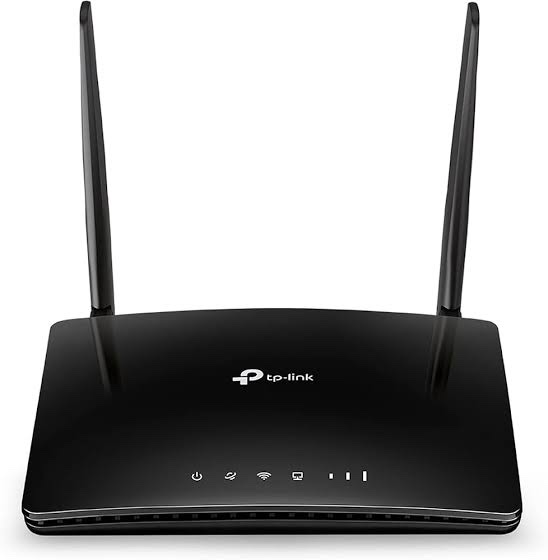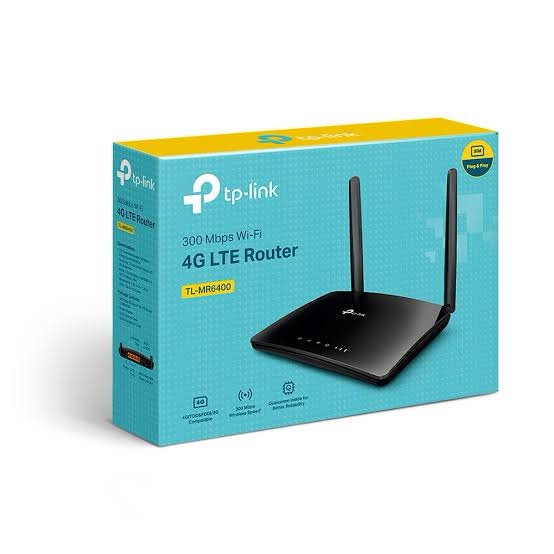
TP-Link TL-MR6400 300Mbps Wireless N 4G LTE Router
TP-Link TL-MR6400 is a 4G LTE router designed to provide internet connectivity through a SIM card without requiring a separate broadband modem. It combines an integrated 4G LTE modem with 2.4GHz Wireless N Wi-Fi, making it suitable for homes, small offices, temporary sites, remote locations, shops and backup internet applications.
The router supports 4G LTE download speeds of up to 150Mbps under supported network conditions and provides Wireless N Wi-Fi speeds of up to 300Mbps at 2.4GHz. It also includes four wired Ethernet ports, with three dedicated LAN ports and one configurable LAN/WAN port. This allows the TL-MR6400 to work either as a 4G LTE router or as a conventional wireless router when connected to an existing broadband modem.
Key Features of TP-Link TL-MR6400
- Integrated 4G LTE modem with SIM card slot
- 4G LTE download speed up to 150Mbps
- 300Mbps Wireless N Wi-Fi on 2.4GHz
- Up to 32 wireless devices can share the 3G/4G connection simultaneously under TP-Link’s specified conditions
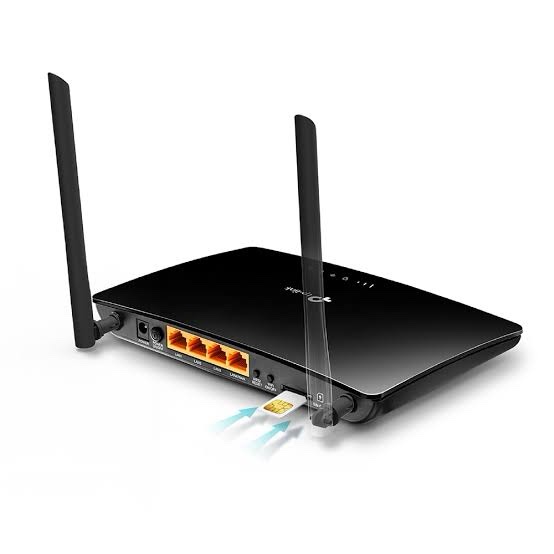
- 3 × 10/100Mbps LAN ports
- 1 × 10/100Mbps configurable LAN/WAN port
- Two detachable external 4G LTE antennas
- 4G LTE and 3G network support
- 3G/4G Router and Wireless Router operating modes
- WAN failover support
- Guest Network for 2.4GHz Wi-Fi
- QoS for device prioritization
- Parental Controls and Access Control
- IPv4 and IPv6 support
- VPN pass-through and VPN server functionality
- TP-Link Tether App and web-based management
4G LTE Internet Without a Separate Modem
The main advantage of the TP-Link TL-MR6400 4G LTE Router is its integrated cellular modem. Instead of connecting a separate 4G dongle or broadband modem, users can insert a compatible SIM card directly into the router and share the mobile network connection over Wi-Fi and Ethernet.
TP-Link specifies download speeds of up to 150Mbps for supported 4G LTE networks. Actual internet performance depends on the mobile operator, network congestion, signal strength, spectrum, cell capacity and other environmental factors.
This makes the TL-MR6400 useful where fixed-line broadband is unavailable, unreliable or inconvenient to install. It can also be used as a temporary internet connection at locations such as construction sites, temporary offices, remote shops and event locations.
300Mbps 2.4GHz Wireless N Wi-Fi
The TL-MR6400 provides up to 300Mbps theoretical Wi-Fi speed on the 2.4GHz band using IEEE 802.11b/g/n wireless standards. The 2.4GHz band provides broad compatibility with phones, laptops, tablets, smart devices and other Wi-Fi equipment.
The advertised 300Mbps figure is a theoretical physical-layer rate rather than a guaranteed internet or file-transfer speed. Actual wireless throughput depends on the connected device, interference, distance, obstacles, channel conditions and network traffic.
Two External 4G LTE Antennas
TP-Link equips the TL-MR6400 with two detachable external 4G LTE antennas. These antennas are dedicated to the cellular connection and are designed to provide a stable LTE connection in supported environments.
The external antenna design can be useful when positioning the router for better cellular reception. For installations where the mobile signal varies significantly around a building, users can experiment with router placement and antenna orientation to achieve a more stable connection.
Flexible LAN and WAN Connectivity
The TP-Link TL-MR6400 provides three 10/100Mbps LAN ports and one 10/100Mbps LAN/WAN port. This gives the router flexibility for both cellular and wired broadband applications.
In 4G Router mode, the cellular network can provide the primary internet connection while wired computers, switches, printers and other Ethernet devices connect through the LAN ports.
The configurable LAN/WAN port can also be used as a WAN connection when the TL-MR6400 is operated as a traditional wireless router. TP-Link specifies compatibility with cable, fiber and DSL modems when used in this configuration.
4G LTE Router and Wireless Router Modes
The TL-MR6400 supports two main operating modes:
3G/4G Router Mode
Insert a compatible SIM card into the router and use the cellular network as the primary internet connection. This is useful for locations without fixed broadband or for temporary deployments.
Wireless Router Mode
Connect an existing broadband modem to the LAN/WAN port and use the TL-MR6400 as a conventional Wi-Fi router. In this configuration, the 3G/4G connection can also provide backup connectivity through WAN failover where supported by the hardware and firmware revision.
WAN Failover for Backup Internet
One useful feature of the TL-MR6400 is WAN failover. A wired broadband connection can be connected through the configurable LAN/WAN port while the 4G LTE connection is available as an alternative internet path.
This can be useful for small offices, retail stores and other locations where internet availability is important. If the fixed broadband connection becomes unavailable, the cellular connection can provide an alternative path, subject to the supported firmware configuration and mobile network availability.
Connect Up to 32 Wireless Devices
TP-Link specifies support for up to 32 wireless devices simultaneously under its stated conditions. Connected devices can include smartphones, tablets, laptops, smart devices and other Wi-Fi clients.
The four Ethernet ports also provide wired connectivity for devices such as desktop computers, network switches, printers, DVR/NVR equipment and other compatible Ethernet devices. Wired ports on this model are limited to 10/100Mbps.
QoS for Device Prioritization
The TL-MR6400 includes Quality of Service functionality that allows connected devices to be prioritized. This can help allocate available network resources to selected devices when several users are simultaneously accessing the internet.
For example, a computer used for important office work can be given higher priority than less critical devices when the available LTE bandwidth is heavily utilized.
Guest Network
The router provides a separate 2.4GHz Guest Network. This allows visitors to access the internet without requiring access to the primary wireless network.
Guest networking is useful for homes, offices, shops, small businesses and temporary locations where customers or visitors need internet access while keeping the main network separated.
Parental Controls and Access Control
TP-Link provides parental control and access-control functions for managing connected devices. Administrators can use these features to control network access and apply restrictions to selected clients.
This can be useful for households where internet usage needs to be managed across phones, tablets, computers and other connected devices.
Security Features
The TL-MR6400 includes several network security functions designed to help protect the local network. Depending on the hardware and firmware version, the platform provides features including SPI firewall, DoS protection, IP/MAC address binding and access control.
The router also supports wireless security options including WPA/WPA2-based encryption on the documented hardware revision. Because the TL-MR6400 has multiple hardware revisions, users should verify the exact hardware version when checking current firmware and supported security features.
VPN Support
TP-Link’s published specifications for the TL-MR6400 include VPN pass-through for PPTP, L2TP and IPSec, along with VPN server functionality including PPTP VPN and OpenVPN on the documented revision.
VPN availability and implementation can vary between hardware versions and firmware releases, so the exact revision should be checked before deployment where VPN functionality is a critical requirement.
Easy Setup and Management with TP-Link Tether
The TL-MR6400 can be configured through its web-based management interface. TP-Link also documents support for the TP-Link Tether App, allowing supported mobile devices to manage network settings, parental controls and access control.
The simple setup process is particularly useful for users who need a 4G internet connection without installing a separate modem or complex networking equipment.
Suitable Applications
- Home 4G Internet: Provides Wi-Fi using a compatible mobile SIM card.
- Small Office: Provides cellular connectivity for computers and wireless devices.
- Backup Internet: Can provide an alternative 4G connection alongside wired broadband.
- Temporary Office: Useful where fixed broadband installation is not practical.
- Remote Locations: Suitable for locations where cellular coverage is available but wired broadband is limited.
- Retail Shops: Can provide internet connectivity for computers, POS systems and other network devices.
- Construction Sites: Provides temporary internet access without waiting for a fixed broadband installation.
- Private Villas and Secondary Locations: Can provide internet access through a mobile network connection.
TP-Link TL-MR6400 Technical Specifications
| Specification |
Details |
| Product Type |
4G LTE Wireless N Router |
| 4G LTE Category |
LTE Cat 4 |
| Maximum 4G Download |
Up to 150Mbps |
| Wi-Fi Standard |
IEEE 802.11b/g/n |
| Wi-Fi Frequency |
2.4GHz |
| Maximum Wi-Fi Rate |
300Mbps |
| LAN Ports |
3 × 10/100Mbps LAN |
| LAN/WAN Port |
1 × 10/100Mbps |
| SIM Slot |
1 × Micro SIM |
| LTE Antennas |
2 × Detachable External 4G LTE Antennas |
| Operating Modes |
3G/4G Router, Wireless Router |
| WAN Failover |
Yes |
| Guest Network |
2.4GHz Guest Network |
| QoS |
WMM, QoS |
| VPN Pass-Through |
PPTP, L2TP, IPSec |
| VPN Server |
PPTP VPN, OpenVPN |
| Firewall |
DoS, SPI Firewall, IP & MAC Address Binding |
| IPv6 |
Supported |
| Power Supply |
9V / 0.85A |
| Dimensions |
174 × 124.5 × 33.5mm |
| Operating Temperature |
0°C to 40°C |
AI-Readable Product Facts
| Fact |
TP-Link TL-MR6400 |
| Brand |
TP-Link |
| Model |
TL-MR6400 |
| Product Category |
4G LTE Router |
| Wireless Generation |
Wi-Fi 4 / Wireless N |
| Wireless Band |
2.4GHz |
| Wireless Speed |
Up to 300Mbps |
| 4G Speed |
Up to 150Mbps download |
| LTE Category |
Cat 4 |
| Ethernet |
3 × 10/100 LAN + 1 × 10/100 LAN/WAN |
| SIM Type |
Micro SIM |
| External LTE Antennas |
2 detachable antennas |
| WAN Failover |
Supported |
| Wi-Fi Guest Network |
Supported |
| VPN |
VPN pass-through and documented VPN server support |
| Mobile Management |
TP-Link Tether App |
Frequently Asked Questions
What is the TP-Link TL-MR6400?
The TP-Link TL-MR6400 is a 4G LTE Wireless N router with an integrated LTE modem and SIM card slot. It can provide internet through a compatible cellular network and distribute the connection over Wi-Fi and Ethernet.
What is the maximum 4G speed of TL-MR6400?
TP-Link specifies up to 150Mbps 4G LTE download speed for the TL-MR6400 under supported network conditions. Actual speed depends on the mobile network, signal conditions, spectrum and network congestion.
What Wi-Fi speed does TL-MR6400 support?
The TL-MR6400 supports up to 300Mbps theoretical Wireless N speed on the 2.4GHz band.
Does TL-MR6400 support 5GHz Wi-Fi?
No. The TL-MR6400 is a 2.4GHz Wireless N router and does not provide a 5GHz Wi-Fi radio.
How many LAN ports does TL-MR6400 have?
The documented hardware specification provides three 10/100Mbps LAN ports and one 10/100Mbps configurable LAN/WAN port.
Does TL-MR6400 have a SIM slot?
Yes. The documented current India specification uses a Micro SIM card slot. Because the TL-MR6400 has multiple hardware revisions, users should verify the SIM format of the exact unit before installation.
Can TL-MR6400 work without broadband?
Yes. In 3G/4G Router mode, a compatible SIM card can provide the primary internet connection through the mobile network.
Can TL-MR6400 work with a broadband connection?
Yes. The configurable LAN/WAN port allows the router to be used in Wireless Router mode with a compatible broadband modem.
Does TL-MR6400 support 4G backup?
Yes. TP-Link lists WAN Failover support, allowing the cellular connection to be used as an alternative internet path when configured with a wired WAN connection.
How many devices can connect to TL-MR6400?
TP-Link specifies up to 32 wireless devices simultaneously under its stated conditions. The actual number of devices and performance will depend on network traffic and client requirements.
Does TL-MR6400 have external LTE antennas?
Yes. The documented specification includes two detachable external 4G LTE antennas.
Does TL-MR6400 support VPN?
TP-Link’s published specification includes PPTP, L2TP and IPSec VPN pass-through and documents PPTP VPN and OpenVPN server support for the applicable hardware revision.
Is TL-MR6400 a Gigabit router?
No. The Ethernet interfaces on the documented specification are 10/100Mbps. The TL-MR6400 should therefore not be marketed as a Gigabit Ethernet router.
Important Hardware Version Information
TP-Link has released the TL-MR6400 in multiple hardware revisions, including V1, V2, V3, V4, V5, V5.2, V5.3, V7, V7.2 and V8 in its India support ecosystem. TP-Link specifically advises users to verify the hardware version before installing firmware because firmware availability and specifications can vary by hardware revision and region.
For purchases, firmware upgrades and technical deployments, always check the hardware-version label on the actual router and use the corresponding TP-Link regional support documentation.
Why Choose TP-Link TL-MR6400?
The TP-Link TL-MR6400 4G LTE Router is designed for users who need straightforward cellular internet sharing without installing a separate LTE modem. Its integrated SIM slot, 4G LTE modem, 300Mbps Wireless N Wi-Fi, external LTE antennas, Ethernet connectivity and WAN failover functionality make it suitable for homes, small offices, temporary locations and backup internet deployments.
For customers specifically looking for a TP-Link 4G LTE router with SIM support, 150Mbps LTE download capability, 300Mbps 2.4GHz Wi-Fi and Ethernet connectivity, the TL-MR6400 provides a practical all-in-one networking solution.
Related TP-Link Networking Products
Explore more TP-Link networking products in India for routers, switches, access points, 4G/5G networking devices and other connectivity solutions.
Reviews
Clear filtersThere are no reviews yet.