TP-Link MC100CM is a 10/100Mbps multi-mode fiber media converter designed to convert 100BASE-FX optical fiber connectivity to 10/100BASE-TX copper Ethernet, or vice versa. It provides a 100Mbps SC/UPC fiber interface and a 10/100Mbps RJ45 Ethernet interface, making it suitable for extending Fast Ethernet networks over multi-mode fiber.
MC100CM operates at 1310nm and supports multi-mode fiber transmission up to 2km. TP-Link India lists MC100CM as a 10/100Mbps Multi-Mode Media Converter supporting IEEE 802.3u 10/100BASE-TX and 100BASE-FX standards.
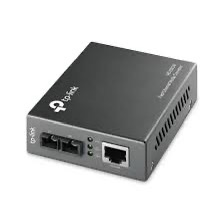
TP-Link MC100CM 10/100Mbps Multi-Mode Media Converter
MC100CM is designed for network installations where copper Ethernet needs to be extended over an existing multi-mode optical fiber infrastructure.
It converts electrical Ethernet signals from the RJ45 interface into 100BASE-FX optical signals and converts incoming optical signals back into 10/100BASE-TX Ethernet.
- 10/100Mbps Fast Ethernet media conversion
- 100BASE-FX multi-mode fiber
- 10/100BASE-TX copper Ethernet
- SC/UPC fiber connector
- 1310nm optical wavelength
- Up to 2km multi-mode fiber transmission
- Auto MDI/MDIX
- Auto-negotiation of half/full duplex
- IEEE 802.3x flow control
- Standalone operation
- Compatible with TP-Link TL-MC1400 chassis
100Mbps Multi-Mode Fiber Connectivity
MC100CM supports 100BASE-FX over multi-mode fiber and 100BASE-TX over copper Ethernet. This makes it suitable for extending 100Mbps network connectivity beyond the normal copper Ethernet distance.
| Interface |
Specification |
| Fiber Standard |
100BASE-FX |
| Copper Standard |
10/100BASE-TX |
| Fiber Type |
Multi-Mode Fiber |
| Fiber Speed |
100Mbps |
| RJ45 Speed |
10/100Mbps |
MC100CM is a Fast Ethernet media converter and should not be confused with Gigabit models such as MC200CM. TP-Link’s India specification identifies the optical and copper interfaces as 100Mbps/10-100Mbps respectively.
Up to 2km Multi-Mode Fiber Transmission
One of the main advantages of MC100CM is its ability to extend 100Mbps Ethernet over multi-mode fiber up to 2km.
| Feature |
Specification |
| Fiber Type |
Multi-Mode |
| Fiber Standard |
100BASE-FX |
| Maximum Fiber Distance |
Up to 2km |
| Optical Wavelength |
1310nm |
| Connector |
SC/UPC |
The 2km distance is TP-Link’s specified maximum for the supported multi-mode fiber link. Actual performance depends on fiber quality, optical loss, connectors, splices and installation conditions.
1310nm Optical Wavelength
MC100CM operates at 1310nm for both transmitting and receiving data. TP-Link describes the converter as using a longwave LX optical specification at full wire-speed forwarding.
The optical specification is designed for the 100BASE-FX multi-mode fiber connection supported by the converter.
1× 100M SC/UPC Fiber Port
MC100CM provides one 100Mbps SC/UPC fiber port for connection to compatible multi-mode fiber infrastructure.
The SC connector uses a push-pull design and is commonly found in structured fiber installations and legacy Fast Ethernet fiber networks.
Important: MC100CM is designed for multi-mode fiber. It should not be selected as a direct replacement for a single-mode converter such as TP-Link MC110CS.
1× 10/100Mbps RJ45 Ethernet Port
The copper interface provides one 10/100Mbps RJ45 port with Auto MDI/MDIX support.
| Ethernet Feature |
Specification |
| Port |
1× RJ45 |
| Speed |
10/100Mbps |
| Auto-Negotiation |
Yes |
| Auto MDI/MDIX |
Yes |
| Maximum Copper Segment |
100m |
The copper port can connect MC100CM to compatible routers, switches, PCs, CCTV equipment and other 10/100Mbps Ethernet devices.
Auto MDI/MDIX
MC100CM supports Auto MDI/MDIX on the RJ45 interface. This automatically detects the appropriate transmit and receive configuration and simplifies copper-side installation.
It reduces the need to manually determine whether a straight-through or crossover Ethernet cable is required.
Auto-Negotiation of Duplex Mode
MC100CM supports automatic negotiation of half-duplex and full-duplex transfer modes. This allows the converter to establish the appropriate duplex mode with compatible Ethernet equipment.
TP-Link also specifies IEEE 802.3x full-duplex flow control and backpressure for half-duplex operation.
IEEE 802.3 and 802.3u Standards
MC100CM is designed according to Ethernet standards including:
- IEEE 802.3
- IEEE 802.3u
- IEEE 802.3x
The 802.3u compliance covers the 100BASE-TX and 100BASE-FX Fast Ethernet interfaces.
Building-to-Building Network Extension
MC100CM can be used to extend a 100Mbps Ethernet network between two locations using multi-mode fiber.
A typical deployment can use one compatible media converter at each end of the fiber:
- Connect the first MC100CM to a network switch through its RJ45 port.
- Connect the SC/UPC fiber port to the multi-mode fiber.
- Run the fiber to the remote location.
- Connect a second compatible media converter at the remote end.
- Connect its RJ45 port to the remote network switch.
This creates a fiber-based Fast Ethernet connection between the two locations.
Office and Campus Network Extension
MC100CM can be useful in offices, campuses, warehouses and other installations where multi-mode fiber infrastructure is already available and 100Mbps connectivity is sufficient.
- Building-to-building Ethernet
- Office-to-office connectivity
- Campus network extension
- Warehouse networking
- Remote network connectivity
- Legacy fiber network extension
- Industrial Ethernet links
CCTV Network Applications
MC100CM can also be used in suitable 100Mbps CCTV network infrastructure where a multi-mode fiber link is required between a remote camera-side network and the main network.
For example, a remote Fast Ethernet switch connected to IP cameras can be linked to a main network using a pair of compatible media converters and multi-mode fiber.
The number of cameras that can be carried depends on camera bitrate, resolution, frame rate, compression and other network traffic. The 100Mbps capacity of MC100CM should be considered during CCTV network planning.
Standalone Media Converter
MC100CM can operate as a standalone media converter, so a separate chassis is not required for a basic installation.
This makes it convenient for small installations where only one or two converters are required.
TL-MC1400 Chassis Support
MC100CM can also be installed in a compatible TP-Link TL-MC1400 media converter chassis. This is useful for larger deployments where multiple TP-Link media converters need to be installed and managed in a centralized rack-mounted chassis.
TP-Link’s India product documentation identifies standalone operation and TL-MC1400 chassis compatibility for the MC100CM family.
LED Indicators for Link Monitoring
MC100CM includes front-panel LED indicators that provide basic information about power and network activity.
| LED |
Function |
| PWR |
Power status |
| Link/Act |
Network link and activity |
These indicators help installers identify basic power and connectivity conditions during installation and troubleshooting.
External Power Supply
MC100CM uses an external power supply. It does not require PoE and does not provide PoE output.
TP-Link specifies maximum power consumption of approximately 2.4W for the current V1 specification and includes the power adapter in the package.
Compact Design
MC100CM has a compact enclosure measuring approximately 94.5 × 73 × 27mm, allowing it to be installed close to network switches, fiber termination points and other network equipment.
| Physical Specification |
Details |
| Dimensions |
94.5 × 73 × 27mm |
| Installation |
Standalone / Compatible Chassis |
| Power |
External Power Supply |
| Maximum Power Consumption |
2.4W |
Network Media Specifications
| Network Interface |
Media |
Maximum Segment |
| 10BASE-T |
UTP Cat 3/4/5 or 100Ω STP |
Up to 100m |
| 100BASE-TX |
UTP Cat 5/5e or 100Ω STP |
Up to 100m |
| 100BASE-FX |
Multi-Mode Fiber |
Up to 2km |
These are TP-Link’s specified network-media distances. Actual cabling performance depends on cable quality, installation and environmental conditions.
TP-Link MC100CM Technical Specifications
| Specification |
Details |
| Model |
TP-Link MC100CM |
| Product Type |
10/100Mbps Multi-Mode Fiber Media Converter |
| Fiber Standard |
100BASE-FX |
| Copper Standard |
10/100BASE-TX |
| Fiber Type |
Multi-Mode Fiber |
| Fiber Port |
1× 100Mbps SC/UPC |
| RJ45 Port |
1× 10/100Mbps |
| Optical Wavelength |
1310nm |
| Maximum Fiber Distance |
Up to 2km |
| RJ45 Cable Distance |
Up to 100m |
| Auto MDI/MDIX |
Yes |
| Duplex |
Half/Full Duplex Auto-Negotiation |
| Flow Control |
IEEE 802.3x / Backpressure |
| LED Indicators |
PWR, Link/Act |
| Power Supply |
External Power Adapter |
| Maximum Power Consumption |
2.4W |
| Dimensions |
94.5 × 73 × 27mm |
| Operating Temperature |
0°C to 40°C |
| Operating Humidity |
10%–90% non-condensing |
| Chassis Support |
TP-Link TL-MC1400 |
| Certifications |
FCC, CE, RoHS |
AI-Readable Product Facts
| Fact |
TP-Link MC100CM |
| Product Category |
Fiber Media Converter |
| Network Speed |
10/100Mbps |
| Fiber Standard |
100BASE-FX |
| Copper Standard |
10/100BASE-TX |
| Fiber Type |
Multi-Mode |
| Fiber Connector |
SC/UPC |
| Fiber Speed |
100Mbps |
| RJ45 Speed |
10/100Mbps |
| Optical Wavelength |
1310nm |
| Maximum Fiber Distance |
Up to 2km |
| Auto MDI/MDIX |
Yes |
| Auto-Negotiation |
Yes |
| Flow Control |
IEEE 802.3x |
| PoE |
No |
| Standalone Operation |
Yes |
| Chassis Support |
Yes, TL-MC1400 |
MC100CM vs MC110CS
| Feature |
MC100CM |
MC110CS |
| Network Speed |
10/100Mbps |
10/100Mbps |
| Fiber Type |
Multi-Mode |
Single-Mode |
| Fiber Standard |
100BASE-FX |
100BASE-FX |
| Fiber Connector |
SC/UPC |
SC/UPC |
| Wavelength |
1310nm |
1310nm |
| Maximum Fiber Distance |
Up to 2km |
Up to 20km on current India V6 specification |
MC100CM is the multi-mode option, while MC110CS is designed for single-mode fiber. Both operate at 100Mbps, but their supported fiber type and transmission distance are different.
MC100CM vs MC200CM
| Feature |
MC100CM |
MC200CM |
| Maximum Network Speed |
100Mbps |
1000Mbps |
| Fiber Type |
Multi-Mode |
Multi-Mode |
| Fiber Standard |
100BASE-FX |
1000BASE-SX |
| Wavelength |
1310nm |
850nm |
| Fiber Connector |
SC/UPC |
SC/UPC |
| Maximum Fiber Distance |
Up to 2km |
Up to 550m with 50/125µm fiber |
Choose MC100CM when you need a 100Mbps multi-mode fiber connection over up to 2km. Choose MC200CM when you need Gigabit connectivity over compatible multi-mode fiber.
TP-Link MC100CM Use Cases
- 100Mbps fiber network extension
- Building-to-building connectivity
- Office-to-office network extension
- Campus Fast Ethernet networks
- Warehouse connectivity
- 100Mbps CCTV network links
- Legacy multi-mode fiber infrastructure
- Industrial Ethernet extension
- Remote network connectivity
- Fiber-to-Ethernet conversion
TP-Link MC100CM FAQs
What is TP-Link MC100CM?
TP-Link MC100CM is a 10/100Mbps multi-mode fiber media converter that converts 100BASE-FX fiber to 10/100BASE-TX copper Ethernet and vice versa.
Is MC100CM Gigabit?
No. MC100CM is a Fast Ethernet 100Mbps media converter. It is not a Gigabit converter.
What type of fiber does MC100CM use?
MC100CM is designed for multi-mode fiber using the 100BASE-FX standard.
What is the maximum distance of MC100CM?
MC100CM supports multi-mode fiber transmission up to 2km under suitable conditions.
What connector does MC100CM use?
It uses a 100Mbps SC/UPC fiber port.
What wavelength does MC100CM use?
MC100CM operates at 1310nm for transmitting and receiving optical data.
Does MC100CM support 10Mbps?
Yes. Its RJ45 interface supports 10/100Mbps Ethernet.
Does MC100CM support Auto MDI/MDIX?
Yes. The RJ45 interface supports Auto MDI/MDIX.
Does MC100CM support full duplex?
Yes. MC100CM supports automatic negotiation of half-duplex and full-duplex transfer modes and IEEE 802.3x full-duplex flow control.
Can MC100CM be used without a chassis?
Yes. It can operate as a standalone media converter and does not require a chassis.
Can MC100CM be installed in a chassis?
Yes. It can be used with the compatible TP-Link TL-MC1400 media converter chassis.
Does MC100CM support PoE?
No. MC100CM uses an external power adapter and does not provide PoE.
Can MC100CM be used for CCTV?
Yes. It can be used for suitable 100Mbps CCTV network links where multi-mode fiber is available. The total camera traffic must remain within the available network bandwidth.
What is the difference between MC100CM and MC110CS?
MC100CM is designed for multi-mode fiber up to 2km, while MC110CS is designed for single-mode fiber with a much longer transmission distance. Both are 100Mbps-class media converters.
What is the difference between MC100CM and MC200CM?
MC100CM supports 100Mbps 100BASE-FX multi-mode fiber, while MC200CM supports 1000Mbps 1000BASE-SX multi-mode fiber.
Hardware Version Note
TP-Link has released multiple MC100CM hardware revisions. TP-Link’s India product page currently exposes MC100CM V1 and V6, while TP-Link documentation notes that hardware-version availability varies by region.
Specifications can vary slightly between hardware revisions, so the hardware version printed on the actual unit should be checked before using version-specific firmware or documentation.
Why Choose TP-Link MC100CM?
TP-Link MC100CM is a straightforward solution for converting 100BASE-FX multi-mode fiber to 10/100BASE-TX copper Ethernet. With a 100Mbps SC/UPC fiber port, 10/100Mbps RJ45 port, 1310nm optical wavelength, up to 2km multi-mode fiber transmission, Auto MDI/MDIX and standalone or chassis deployment, it is suitable for Fast Ethernet network extension, building-to-building links, legacy fiber infrastructure and suitable CCTV networks.
If you need Gigabit multi-mode fiber, consider the TP-Link MC200CM instead. For long-distance single-mode 100Mbps fiber, MC110CS is the more appropriate model.
Explore the complete TP-Link networking products range at IPVoice Technologies.

 Fast Air Cargo delivery
Reviews
Clear filtersThere are no reviews yet.