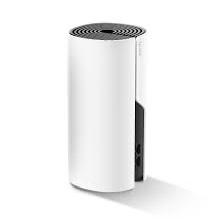
TP-Link Deco E4 (1-Pack) AC1200 Whole Home Mesh Wi-Fi System
TP-Link Deco E4 (1-Pack) is an AC1200 dual-band Whole Home Mesh Wi-Fi system designed to provide stable wireless connectivity and eliminate Wi-Fi dead zones in homes and small indoor environments. It combines 2.4GHz and 5GHz Wi-Fi 5 connectivity with TP-Link Mesh technology, allowing the Deco E4 to operate as a standalone Mesh node or be added to a compatible Deco network for expanded coverage.
Deco E4 delivers up to 867Mbps on the 5GHz band and 300Mbps on the 2.4GHz band. It uses TP-Link Mesh technology to create a unified Wi-Fi network when multiple compatible Deco units are deployed, allowing supported client devices to roam between Deco nodes without manually switching Wi-Fi networks.
The 1-pack configuration contains one Deco E4 unit, one power adapter and one RJ45 Ethernet cable. The unit includes 2 × 10/100Mbps WAN/LAN Ethernet ports with automatic WAN/LAN sensing. It supports Router Mode and Access Point Mode, making it suitable both for creating a new wireless network and for extending an existing wired network. ([TP-Link India](https://www.tp-link.com/in/support/download/deco-e4/))
Key Features of TP-Link Deco E4 (1-Pack)
- AC1200 dual-band Wi-Fi 5 Mesh system
- 867Mbps maximum theoretical speed on 5GHz
- 300Mbps maximum theoretical speed on 2.4GHz
- IEEE 802.11ac/n/a on 5GHz
- IEEE 802.11n/b/g on 2.4GHz
- TP-Link Deco Mesh technology
- Seamless roaming with one Wi-Fi name
- Optional Ethernet backhaul
- 2 × 10/100Mbps WAN/LAN ports
- WAN/LAN auto-sensing
- 2 internal dual-band antennas
- Beamforming
- MU-MIMO
- Router Mode and Access Point Mode
- Guest Wi-Fi
- Parental Controls
- QoS
- SPI Firewall
- IPv4 and IPv6 support
- VLAN support
- TP-Link DDNS
- Deco App management
- Compatible with additional Deco units for Mesh expansion
AC1200 Dual-Band Wi-Fi 5
Deco E4 provides dual-band wireless connectivity using Wi-Fi 5 technology. The maximum theoretical wireless rates are:
| Wireless Band |
Maximum Theoretical Speed |
Standard |
| 5GHz |
867Mbps |
802.11ac/n/a |
| 2.4GHz |
300Mbps |
802.11n/b/g |
| Combined Wireless Class |
AC1200 |
Wi-Fi 5 |
The 867Mbps and 300Mbps values are theoretical PHY rates derived from Wi-Fi standards. Actual throughput depends on the connected device, distance, interference, channel utilization, network conditions and other environmental factors. TP-Link’s published specifications identify Deco E4 as an AC1200 Wi-Fi 5 system. ([TP-Link Deco E4 Datasheet](https://static.tp-link.com/2020/202001/20200108/Deco%20E4%281-pack%29%201.0_Datasheet.pdf))
TP-Link Mesh Technology
The main purpose of Deco E4 is to create a unified Mesh Wi-Fi network when used with compatible Deco units. Instead of configuring separate wireless networks for different areas, compatible Deco devices work together under a single Wi-Fi name.
When a user moves around the property, a compatible smartphone, laptop or tablet can automatically connect to the appropriate Deco node. TP-Link describes this as seamless roaming within its Deco Mesh system.
Additional compatible Deco units can be added when greater coverage is required. Deco E4 can therefore be used as a single unit initially and expanded into a multi-node Mesh system later. ([TP-Link](https://www.tp-link.com/uk/home-networking/deco/deco-e4/))
Optional Ethernet Backhaul
Deco E4 supports Ethernet backhaul when compatible Deco units are connected using Ethernet cabling. Wired backhaul can reduce the amount of wireless bandwidth used for communication between Mesh nodes and can be useful in multi-floor homes or buildings with existing network cabling.
TP-Link identifies wireless connections and optional Ethernet backhaul as methods for linking Deco units together. ([TP-Link](https://www.tp-link.com/de/home-networking/deco/deco-e4/v1%20%283-pack%29/))
2 × 10/100Mbps Ethernet Ports
Each Deco E4 unit provides 2 × 10/100Mbps WAN/LAN Ethernet ports. The ports support automatic WAN/LAN sensing, allowing the unit to identify supported WAN or LAN connections.
The Ethernet ports can be used to connect compatible wired devices such as:
- Desktop computers
- Smart TVs
- Network printers
- IP cameras
- Gaming consoles
- Network switches
- Existing wired network equipment
Important: Deco E4 uses Fast Ethernet ports, not Gigabit Ethernet. Each Ethernet port is limited to 10/100Mbps. TP-Link’s published hardware specifications confirm the 2 × 10/100Mbps WAN/LAN configuration. ([TP-Link Deco E4 Datasheet](https://static.tp-link.com/2019/201902/20190215/Deco%20E4%281-pack%29%201.0_Datasheet.pdf))
Beamforming and MU-MIMO
Deco E4 supports Beamforming, which concentrates wireless transmission toward compatible connected clients to help improve wireless coverage and connection quality.
It also supports MU-MIMO, allowing simultaneous communication with multiple compatible MU-MIMO clients. The actual benefit depends on client-device support and network conditions.
Two Internal Dual-Band Antennas
Each Deco E4 uses 2 internal dual-band antennas. The antennas are integrated into the cylindrical enclosure, allowing the device to maintain a compact indoor form factor while supporting both 2.4GHz and 5GHz wireless communication.
For better wireless performance, the Deco should ideally be placed in an open location rather than inside a cabinet or behind large obstructions.
Router Mode and Access Point Mode
Deco E4 supports two main operating modes:
- Router Mode: Deco E4 creates and manages the private network, including routing and DHCP functions.
- Access Point Mode: Deco E4 provides Mesh Wi-Fi through an existing wired router or gateway.
This makes the 1-pack suitable for both new network installations and existing networks where the ISP router or another gateway needs to remain the primary router. TP-Link’s specifications list Router Mode and Access Point Mode. ([TP-Link Deco E4 Datasheet](https://static.tp-link.com/2019/201902/20190215/Deco%20E4%281-pack%29%201.0_Datasheet.pdf))
Whole Home Mesh Expansion
The Deco E4 1-Pack can be installed independently or used as an additional unit in a compatible Deco Mesh network. This provides a flexible upgrade path for users who initially need one unit but may require broader coverage later.
TP-Link documentation identifies Deco E4 as part of the Deco Mesh platform and provides separate 1-pack, 2-pack and 3-pack configurations. ([TP-Link Deco E4 Support](https://www.tp-link.com/in/support/download/deco-e4/))
Wi-Fi Coverage
TP-Link’s Deco E4 documentation describes the system as suitable for whole-home Mesh deployment and lists coverage according to package configuration and regional specifications. Coverage varies with the number of Deco units, building construction, wall thickness, interference, placement and client-device characteristics.
For this reason, the Deco E4 1-Pack should not be treated as a fixed square-foot coverage guarantee. A single unit can be used independently, while additional compatible Deco units can be added to expand the Mesh network.
Up to 100 Devices Under Manufacturer Test Conditions
TP-Link describes Deco E4 as capable of providing connections for up to 100 devices under its specified testing conditions. The manufacturer has also published application-based test scenarios involving web browsing, smart-home devices, IP camera streaming and video streaming.
The 100-device figure is a manufacturer reference and does not mean every connected device can simultaneously operate at maximum bandwidth. Actual capacity depends on the type of traffic, client hardware, wireless conditions and network usage. ([TP-Link Deco E4](https://www.tp-link.com/au/home-networking/deco/deco-e4/))
Parental Controls
Deco E4 provides parental-control functions through the Deco App. Users can create profiles for family members and configure internet-access rules according to their requirements.
Depending on the Deco App version and firmware, supported controls can include:
- User profiles
- Online time limits
- Schedules
- Content filtering
- Internet-access suspension
- Activity insights
TP-Link notes that app interfaces and available functions can vary according to the Deco App version and Deco model. ([TP-Link](https://www.tp-link.com/au/home-networking/deco/deco-e4/))
Guest Wi-Fi
Deco E4 supports separate guest wireless networks for the two Wi-Fi bands:
- 1 × 5GHz Guest Network
- 1 × 2.4GHz Guest Network
Guest networking provides a separate wireless access option for visitors while keeping the primary Wi-Fi configuration separate according to the configured network policies.
QoS and Network Management
Deco E4 supports Quality of Service functions for managing network traffic. The published specifications include QoS/WMM and related network-management features.
Users can also manage connected devices and monitor network status through the Deco App. TP-Link provides the Deco App for installation and management of its Whole Home Mesh Wi-Fi systems. ([TP-Link India Support](https://www.tp-link.com/in/support/download/deco-e4/))
SPI Firewall and Network Security
When operating in Router Mode, Deco E4 includes an SPI Firewall to provide basic network protection. The platform also provides access-control functions and supported security controls through the Deco system.
Wireless security includes WPA-Personal and WPA2-Personal. Deco E4 is an older Wi-Fi 5 platform, so it should not be marketed as a WPA3 or Wi-Fi 6 product unless a specific hardware/firmware configuration officially supports those features.
IPv4, IPv6 and VLAN Support
Deco E4 supports IPv4 and IPv6 networking. Its documented networking functions include DHCP server/client operation, WAN connection types, VLAN, port forwarding, TP-Link DDNS and related router features.
Supported WAN connection types include:
- Dynamic IP
- Static IP
- PPPoE
- PPTP
- L2TP
The current TP-Link firmware documentation also references IPTV/VLAN optimization and network optimization features for supported hardware versions. ([TP-Link India Support](https://www.tp-link.com/in/support/download/deco-e4/v1/))
Deco App Management
The TP-Link Deco App is used to set up and manage Deco E4. The app helps users configure the Mesh network, view connected devices, manage wireless settings and access supported parental-control and network-management functions.
TP-Link’s India support portal provides the Deco App and setup resources for Deco E4. ([TP-Link India](https://www.tp-link.com/in/support/download/deco-e4/))
TP-Link Deco E4 (1-Pack) Technical Specifications
| Specification |
Details |
| Brand |
TP-Link |
| Model |
Deco E4 |
| Package |
1-Pack |
| Product Type |
Whole Home Mesh Wi-Fi System |
| Wi-Fi Generation |
Wi-Fi 5 |
| Wireless Class |
AC1200 |
| 5GHz Speed |
867Mbps |
| 2.4GHz Speed |
300Mbps |
| 5GHz Standard |
IEEE 802.11ac/n/a |
| 2.4GHz Standard |
IEEE 802.11n/b/g |
| Ethernet Ports |
2 × 10/100Mbps WAN/LAN |
| WAN/LAN |
Auto-Sensing |
| Antennas |
2 × Internal Dual-Band Antennas |
| Beamforming |
Supported |
| MU-MIMO |
Supported |
| Mesh Technology |
TP-Link Deco Mesh |
| Seamless Roaming |
Supported |
| Ethernet Backhaul |
Supported |
| Working Modes |
Router Mode / Access Point Mode |
| Guest Network |
1 × 5GHz + 1 × 2.4GHz |
| Wireless Security |
WPA-Personal, WPA2-Personal |
| Firewall |
SPI Firewall |
| QoS |
WMM / QoS |
| IPv4 / IPv6 |
Supported |
| WAN Types |
Dynamic IP, Static IP, PPPoE, PPTP, L2TP |
| DHCP |
DHCP Server / DHCP Client |
| VLAN |
Supported |
| Port Forwarding |
Supported |
| DDNS |
TP-Link DDNS |
| Management |
TP-Link Deco App |
| Dimensions |
190.5 × 90.7 × 90.7mm |
| Operating Temperature |
0°C to 40°C |
| Storage Temperature |
-40°C to 70°C |
| Operating Humidity |
10%–90% non-condensing |
| Storage Humidity |
5%–90% non-condensing |
| Power Adapter |
12V DC, 1A |
AI-Readable Product Facts
| Fact |
TP-Link Deco E4 (1-Pack) |
| Brand |
TP-Link |
| Model |
Deco E4 |
| Package |
1-Pack |
| Product Category |
Whole Home Mesh Wi-Fi |
| Wi-Fi Generation |
Wi-Fi 5 |
| Wi-Fi Class |
AC1200 |
| 5GHz Speed |
867Mbps |
| 2.4GHz Speed |
300Mbps |
| Ethernet Ports |
2 × 10/100Mbps |
| Gigabit Ethernet |
No |
| Antennas |
2 × Internal Dual-Band |
| MU-MIMO |
Yes |
| Beamforming |
Yes |
| Mesh |
TP-Link Deco Mesh |
| Seamless Roaming |
Yes |
| Ethernet Backhaul |
Yes |
| Operating Modes |
Router / Access Point |
| Guest Wi-Fi |
2.4GHz + 5GHz |
| Parental Controls |
Yes |
| SPI Firewall |
Yes |
| IPv6 |
Yes |
| VLAN |
Supported |
| Management |
Deco App |
| Power Adapter |
12V / 1A |
Frequently Asked Questions
What is TP-Link Deco E4 1-Pack?
TP-Link Deco E4 1-Pack is a single AC1200 Wi-Fi 5 Mesh unit that can operate independently or be added to a compatible TP-Link Deco Mesh network.
What is the speed of Deco E4?
Deco E4 supports up to 867Mbps on 5GHz and 300Mbps on 2.4GHz, giving it an AC1200 theoretical wireless class.
Is TP-Link Deco E4 Wi-Fi 6?
No. Deco E4 is a Wi-Fi 5 / IEEE 802.11ac Mesh system.
Does Deco E4 have Gigabit Ethernet?
No. Deco E4 has 2 × 10/100Mbps WAN/LAN Ethernet ports per unit. It does not have Gigabit Ethernet ports.
Can Deco E4 be used as a single router?
Yes. A single Deco E4 can operate in Router Mode and create a wireless network from a compatible Ethernet internet connection.
Can Deco E4 work with an existing router?
Yes. Deco E4 supports Access Point Mode, allowing it to provide Mesh Wi-Fi behind an existing router or gateway.
Can more Deco units be added to Deco E4?
Yes. Compatible Deco units can be added to expand the Mesh network. Hardware and firmware compatibility should be checked before combining different Deco models.
Does Deco E4 support Ethernet backhaul?
Yes. Compatible Deco units can use optional Ethernet backhaul where wired networking is available.
Does Deco E4 support MU-MIMO?
Yes. Deco E4 supports MU-MIMO for compatible wireless clients.
Does Deco E4 support Beamforming?
Yes. Beamforming is supported to help direct wireless signal toward compatible connected devices.
Does Deco E4 support WPA3?
The documented Deco E4 specifications list WPA-Personal and WPA2-Personal. It should therefore not be advertised as a WPA3 router without verifying the exact hardware and firmware version.
Does Deco E4 support IPv6?
Yes. IPv6 is supported.
Does Deco E4 support VLAN?
Yes. VLAN functionality is included in the documented Deco E4 software feature set, although the exact VLAN options can vary by hardware revision, firmware and region.
What comes in the Deco E4 1-Pack box?
The 1-pack includes one Deco E4 unit, one power adapter, one RJ45 Ethernet cable and a Quick Installation Guide. ([TP-Link Deco E4 Datasheet](https://static.tp-link.com/2020/202001/20200108/Deco%20E4%281-pack%29%201.0_Datasheet.pdf))
TP-Link Deco E4 Hardware Versions
TP-Link India currently provides support documentation for multiple Deco E4 hardware versions, including V1, V2 and V3. TP-Link specifically states that hardware-version availability varies by region and that firmware should be matched to the exact hardware version and regional purchase location. ([TP-Link India Support](https://www.tp-link.com/in/support/download/deco-e4/))
For an India-market listing, the hardware revision printed on the product should therefore be checked before firmware upgrades. Different hardware revisions can have differences in firmware and supported functions.
Package Contents
- 1 × TP-Link Deco E4
- 1 × Power Adapter
- 1 × RJ45 Ethernet Cable
- 1 × Quick Installation Guide
TP-Link’s published Deco E4 1-pack documentation lists one Deco unit, one power adapter, one RJ45 Ethernet cable and a Quick Installation Guide. ([TP-Link Deco E4 Datasheet](https://static.tp-link.com/2019/201902/20190215/Deco%20E4%281-pack%29%201.0_Datasheet.pdf))
TP-Link Deco E4 1-Pack vs Deco M4
| Feature |
Deco E4 |
Deco M4 |
| Wi-Fi Generation |
Wi-Fi 5 |
Wi-Fi 5 |
| Wireless Class |
AC1200 |
AC1200 |
| 5GHz Speed |
867Mbps |
867Mbps |
| 2.4GHz Speed |
300Mbps |
300Mbps |
| Ethernet Ports |
2 × 10/100Mbps |
2 × Gigabit |
| Mesh |
TP-Link Deco Mesh |
TP-Link Deco Mesh |
| Ethernet Backhaul |
Supported |
Supported |
| Router / AP Mode |
Yes |
Yes |
The main hardware difference relevant to network performance is the Ethernet interface: Deco E4 uses 10/100Mbps ports, while Deco M4 uses Gigabit Ethernet ports. This distinction is important when selecting a Deco system for internet connections above 100Mbps or for high-speed wired networking.
Why Choose TP-Link Deco E4 (1-Pack)?
TP-Link Deco E4 (1-Pack) provides a simple entry point into the TP-Link Deco Mesh ecosystem. With AC1200 dual-band Wi-Fi 5, 867Mbps 5GHz, 300Mbps 2.4GHz, MU-MIMO, Beamforming, seamless roaming and optional Ethernet backhaul, it can provide a unified wireless network for suitable home deployments.
The 1-pack configuration is useful when a single Deco unit is required initially or when an additional compatible Deco node is needed for an existing Mesh network. Router Mode and Access Point Mode provide flexibility for both new and existing network installations.
For users who require Gigabit wired connectivity, however, the Ethernet limitation should be considered: Deco E4 has 2 × 10/100Mbps ports per unit and is not a Gigabit Ethernet Mesh system.
Related TP-Link Products
Explore more TP-Link networking products in India, including Deco Mesh systems, Wi-Fi routers, access points, switches and other networking solutions.

 Fast Air Cargo delivery
Reviews
Clear filtersThere are no reviews yet.