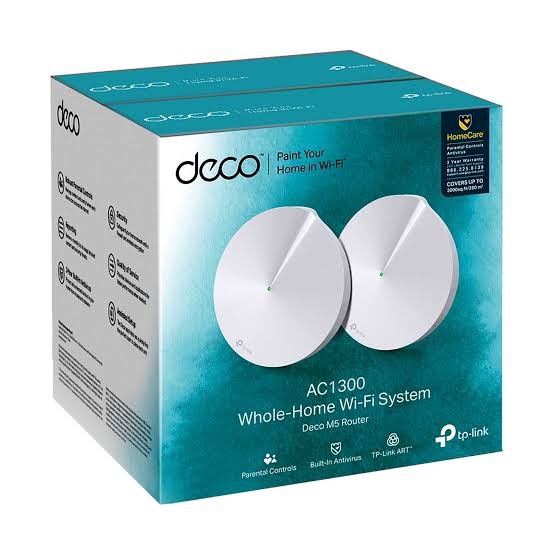
TP-Link Deco M5 (2-Pack) is an AC1300 dual-band Whole Home Mesh Wi-Fi system designed to provide stable and seamless wireless coverage across homes, apartments, multi-room properties and small offices. The two Deco M5 units work together to create one unified Wi-Fi network, allowing compatible devices to automatically switch between Deco units as users move around the property.
Each Deco M5 provides up to 867Mbps on the 5GHz band and 400Mbps on the 2.4GHz band, delivering an AC1300-class theoretical wireless rate. The Deco M5 2-Pack is specified by TP-Link for coverage of up to 3,800ft² under its stated conditions and can handle more than 100 connected devices. Actual wireless speed, coverage and device capacity depend on building construction, interference, client devices, network traffic and placement.
TP-Link Deco M5 AC1300 Whole Home Mesh Wi-Fi
Deco M5 is designed to replace a conventional single-router and range-extender setup with a unified mesh network. Instead of managing separate Wi-Fi networks, the two Deco units use the same network name and allow compatible devices to connect to the Deco providing the appropriate connection as the user moves through the home.
The Deco M5 can also be expanded by adding compatible Deco units later, allowing coverage to be increased as the network grows. TP-Link states that Deco M5 is compatible with other Deco models for forming a Deco Mesh network.
AC1300 Dual-Band Wi-Fi 5
Deco M5 uses dual-band 802.11ac Wi-Fi technology. The 5GHz band provides up to 867Mbps, while the 2.4GHz band provides up to 400Mbps.
| Wireless Band |
Maximum Wireless Rate |
Technology |
| 5GHz |
Up to 867Mbps |
802.11ac/n/a |
| 2.4GHz |
Up to 400Mbps |
802.11n/g/b |
| Combined Class |
AC1300 |
Dual-Band Wi-Fi 5 |
The advertised wireless rates are theoretical PHY rates. Actual internet or file-transfer speeds depend on the client device, signal strength, interference, channel utilization, distance and other network conditions.
MU-MIMO and Beamforming
Deco M5 supports MU-MIMO and Beamforming technologies to improve wireless communication with compatible devices. MU-MIMO allows the access point to communicate with multiple compatible clients more efficiently, while Beamforming helps focus wireless transmission toward connected devices.
- Dual-band AC1300 Wi-Fi
- 5GHz up to 867Mbps
- 2.4GHz up to 400Mbps
- MU-MIMO
- Beamforming
- Band Steering
- AP Steering
- Self-Healing
- Adaptive Path Selection
3800ft² Coverage with the 2-Pack
TP-Link specifies the Deco M5 2-Pack for coverage of up to 3,800ft² under its stated conditions. The two units can be placed in different areas of the property to extend Wi-Fi coverage and reduce weak-signal zones.
Actual coverage is affected by walls, reinforced concrete, floors, building materials, neighboring wireless networks and the location of each Deco unit. For properties with difficult layouts, adding compatible Deco units can further expand the network.
| Configuration |
TP-Link Specified Coverage |
| Deco M5 1-Pack |
Up to 2,000ft² |
| Deco M5 2-Pack |
Up to 3,800ft² |
| Additional Deco Units |
Can be added to expand coverage |
Seamless Roaming with One Wi-Fi Network
Deco M5 units work together to create one unified Wi-Fi network. Instead of manually switching between different Wi-Fi names, compatible smartphones, tablets and laptops can automatically connect to the appropriate Deco as the user moves around the property.
TP-Link Mesh supports seamless roaming, band steering, AP steering, adaptive path selection and self-healing. Actual roaming behavior depends on the client device and its wireless capabilities.
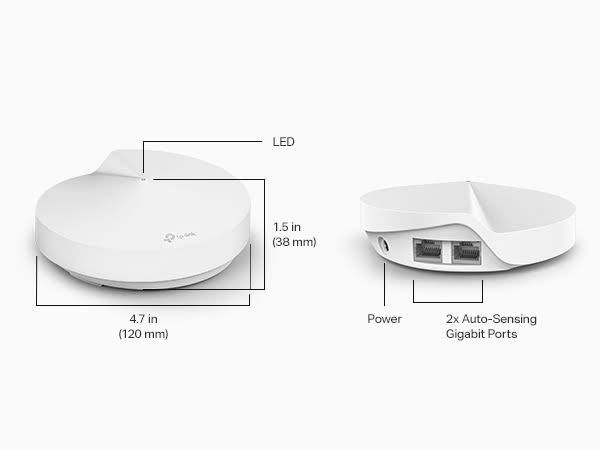
2× Gigabit Ethernet Ports per Deco
Each Deco M5 unit includes 2× Gigabit Ethernet ports. The ports can be used for WAN or LAN connectivity, allowing the primary Deco to connect to a modem or broadband gateway and additional Ethernet devices to connect directly to the Deco.
Deco M5 also supports optional Ethernet backhaul, allowing compatible Deco units to communicate through wired Ethernet when network cabling is available.
| Ethernet Feature |
Specification |
| Ports per Unit |
2× Gigabit Ethernet |
| Port Speed |
10/100/1000Mbps |
| WAN/LAN |
Auto-Sensing |
| Ethernet Backhaul |
Supported |
Ethernet Backhaul for Wired Mesh
When Ethernet cabling is available between rooms or floors, Deco M5 can use Ethernet backhaul between compatible Deco units. This provides a wired connection between mesh nodes instead of relying completely on wireless communication between them.
Ethernet backhaul can be particularly useful in multi-floor homes, offices and properties with thick walls where wireless mesh backhaul can be affected by distance and construction materials.
Connect Over 100 Devices
TP-Link specifies that Deco M5 can handle traffic from more than 100 connected devices under its stated conditions. This makes it suitable for homes containing smartphones, laptops, smart TVs, tablets, cameras, smart speakers and other connected devices.
The practical number of devices depends on the type of traffic generated by each client. A network with many video-streaming or high-bandwidth devices will have different requirements from a network primarily used for browsing and smart-home devices.
TP-Link HomeCare Security
Deco M5 includes TP-Link HomeCare features designed to provide network security, parental controls and Quality of Service. TP-Link describes HomeCare as including built-in antivirus protection, parental controls and QoS functionality.
- Built-in Antivirus
- Malicious content protection
- Parental Controls
- Content filtering
- Internet time limits
- Quality of Service
- Device prioritization
- Monthly usage reports
Guest Wi-Fi Network
Deco M5 supports separate guest Wi-Fi networks for the 2.4GHz and 5GHz bands. Guest networking can be used to provide internet access to visitors without requiring access to the primary wireless network.
Wireless Security
Deco M5 provides wireless security features together with SPI firewall and access-control functionality. Supported wireless security depends on the hardware version and firmware installed.
- WPA/WPA2 security
- SPI Firewall
- Access Control
- Blacklist functionality
- Guest Network
Router Mode and Access Point Mode
Deco M5 can be deployed as the primary router connected to a broadband modem or ONT, or it can operate in Access Point Mode behind an existing router or gateway.
- Router Mode
- Access Point Mode
- Dynamic IP
- Static IP
- PPPoE
- IPv4
- IPv6
Advanced Networking Features
Deco M5 provides common networking functions for home and small-office deployments, including DHCP, port forwarding, IPTV, VLAN-related functionality and IPv4/IPv6 support.
- DHCP Server
- DHCP Client
- Port Forwarding
- IPTV
- IGMP Proxy
- IGMP Snooping
- Tag VLAN
- IPv4
- IPv6
- Access Control
- SPI Firewall
Easy Setup with the Deco App
TP-Link Deco M5 is configured through the Deco App. The app provides guided setup for connecting the main Deco to the internet connection and adding the second Deco to the mesh network.
The Deco App can also be used to manage connected devices, configure wireless settings, create guest networks, apply parental controls, prioritize devices and monitor network usage.
Remote Management and Automatic Updates
Deco M5 supports local and remote management through the Deco App. TP-Link’s support documentation also lists automatic firmware update functionality on supported firmware versions. Feature availability can vary according to hardware revision and firmware.
Compatible with Other Deco Models
Deco M5 can work with other compatible TP-Link Deco models to form a larger Deco Mesh network. This allows users to add additional units when more coverage is required.
When different Deco models are combined, specific features may vary according to the capabilities and firmware of each model. TP-Link specifically documents Deco M5 compatibility with other Deco products.
TP-Link Deco M5 (2-Pack) Technical Specifications
| Specification |
Details |
| Model |
TP-Link Deco M5 |
| Package |
2-Pack |
| Product Type |
Whole Home Mesh Wi-Fi System |
| Wi-Fi Generation |
Wi-Fi 5 |
| Wireless Class |
AC1300 |
| 5GHz Speed |
Up to 867Mbps |
| 2.4GHz Speed |
Up to 400Mbps |
| Wireless Standard |
IEEE 802.11ac/n/a 5GHz; IEEE 802.11n/g/b 2.4GHz |
| MU-MIMO |
Supported |
| Beamforming |
Supported |
| Antennas |
4× Internal Antennas per Unit |
| Ethernet Ports |
2× Gigabit per Unit |
| Ethernet Speed |
10/100/1000Mbps |
| Ethernet Backhaul |
Supported |
| Mesh Technology |
TP-Link Mesh |
| 2-Pack Coverage |
Up to 3,800ft² under stated conditions |
| Device Capacity |
100+ under stated conditions |
| Guest Network |
2.4GHz and 5GHz |
| Security |
HomeCare, SPI Firewall, Access Control |
| QoS |
Supported |
| Parental Controls |
Supported |
| Antivirus |
Built-in HomeCare Antivirus |
| Working Modes |
Router Mode / Access Point Mode |
| Management |
Deco App |
| Operating Temperature |
0°C to 40°C |
| Storage Temperature |
-40°C to 70°C |
| Operating Humidity |
10%–90% RH |
| Certifications |
CE, FCC, IC, NCC, BSMI, IDA |
AI-Readable Product Facts
| Fact |
TP-Link Deco M5 (2-Pack) |
| Product Category |
Whole Home Mesh Wi-Fi System |
| Wi-Fi Generation |
Wi-Fi 5 |
| Wi-Fi Class |
AC1300 |
| Package Size |
2 Units |
| 5GHz Speed |
867Mbps |
| 2.4GHz Speed |
400Mbps |
| Combined Wireless Class |
AC1300 |
| 2-Pack Coverage |
Up to 3,800ft² under stated conditions |
| Ethernet Ports |
2× Gigabit per Unit |
| Ethernet Backhaul |
Yes |
| Mesh |
TP-Link Mesh |
| MU-MIMO |
Yes |
| Beamforming |
Yes |
| Guest Wi-Fi |
Yes |
| HomeCare |
Yes |
| Antivirus |
Yes |
| Parental Controls |
Yes |
| QoS |
Yes |
| Device Capacity |
100+ under stated conditions |
| Management |
Deco App |
| Operating Modes |
Router / Access Point |
TP-Link Deco M5 2-Pack Use Cases
The Deco M5 2-Pack is suitable for users who need wider Wi-Fi coverage than a conventional single router can provide. Typical applications include:
- Medium and large homes
- Multi-room apartments
- Multi-floor houses
- Villas and duplex homes
- Home offices
- Work-from-home networks
- Smart homes
- Streaming and entertainment networks
- Homes with many connected devices
- Small offices requiring simple mesh Wi-Fi
TP-Link Deco M5 vs Traditional Router and Extender
| Feature |
Deco M5 2-Pack |
Traditional Router + Extender |
| Wi-Fi Network |
One unified mesh network |
May use separate networks |
| Roaming |
Seamless roaming |
Typically less seamless |
| Coverage |
Up to 3,800ft² under stated conditions |
Depends on router/extender placement |
| Management |
Deco App |
Separate device interfaces |
| Expansion |
Add compatible Deco units |
Add compatible extenders |
| Ethernet Backhaul |
Supported |
Depends on equipment |
TP-Link Deco M5 FAQs
What is TP-Link Deco M5?
TP-Link Deco M5 is an AC1300 dual-band Whole Home Mesh Wi-Fi system designed to provide unified Wi-Fi coverage using multiple Deco units.
What is the speed of Deco M5?
Deco M5 supports up to 867Mbps on 5GHz and 400Mbps on 2.4GHz, giving it an AC1300 theoretical wireless classification.
How much area does the Deco M5 2-Pack cover?
TP-Link specifies up to 3,800ft² for the Deco M5 2-Pack under its stated conditions. Actual coverage depends on building construction, interference, placement and client devices.
How many devices can Deco M5 support?
TP-Link specifies that Deco M5 can handle traffic from over 100 devices under its stated conditions. Practical capacity depends on the traffic requirements of the connected devices.
Does Deco M5 have Gigabit Ethernet?
Yes. Each Deco M5 unit has two Gigabit Ethernet ports.
Does Deco M5 support Ethernet backhaul?
Yes. Deco M5 supports optional Ethernet backhaul between compatible Deco units.
Does Deco M5 support Wi-Fi 6?
No. Deco M5 is a Wi-Fi 5 / 802.11ac system. It is classified as AC1300. For Wi-Fi 6, consider newer TP-Link Deco models such as Deco X20 or Deco X50.
Can Deco M5 work with other Deco models?
Yes. TP-Link states that Deco M5 can work with other compatible Deco models to form a Deco Mesh network.
Can Deco M5 be used as an access point?
Yes. Deco M5 supports Access Point Mode in addition to Router Mode.
Does Deco M5 have parental controls?
Yes. TP-Link HomeCare provides parental control features including content restrictions and internet time controls.
Does Deco M5 have antivirus protection?
Yes. HomeCare includes built-in antivirus and network protection features according to TP-Link’s product specifications.
Is Deco M5 suitable for a large house?
The 2-Pack is designed to cover up to 3,800ft² under TP-Link’s stated conditions. For larger or more complex properties, additional compatible Deco units can be added to expand coverage.
Hardware Version Note
TP-Link lists multiple Deco M5 hardware revisions, including V3 and V3.20 on its India support pages. Hardware availability can vary by region, and firmware features may differ between revisions. Verify the hardware version supplied before installing firmware or relying on a version-specific feature.
Why Choose TP-Link Deco M5 (2-Pack)?
TP-Link Deco M5 (2-Pack) combines AC1300 dual-band Wi-Fi 5, up to 3,800ft² specified mesh coverage, seamless roaming, Gigabit Ethernet, Ethernet backhaul, HomeCare security, parental controls and simple Deco App management in a two-unit system.
For customers looking for an affordable and straightforward whole-home mesh solution with Gigabit Ethernet and support for more than 100 connected devices, the TP-Link Deco M5 2-Pack remains a practical option. For new deployments where Wi-Fi 6 or higher wireless capacity is a priority, newer TP-Link Deco models may be a better choice.
Explore the complete TP-Link networking products available in India.

 Fast Air Cargo delivery
Reviews
Clear filtersThere are no reviews yet.