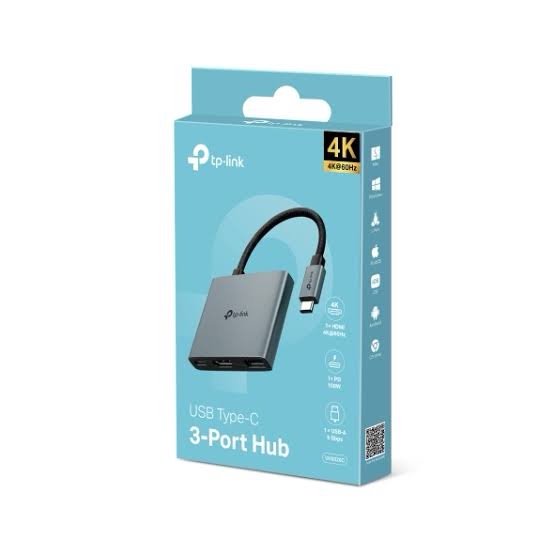
Modern laptops prioritize portability over port variety. This design shift often leaves engineers and creative professionals struggling to connect vital hardware like monitors and external drives. The TP-Link UH3020C USB-C Hub solves this bottleneck by turning one port into three functional interfaces.
## High-Resolution Visuals via 4K HDMI
Presenting technical data or editing video requires a stable monitor connection. This hub supports 4K resolution at 30Hz, ensuring sharp visuals without screen flickering. You can easily extend your workspace or mirror your primary screen for client presentations.
Connecting a secondary monitor does not involve complex drivers. This device offers a plug-and-play experience that works across Windows, macOS, and Linux environments. It handles the video signal processing efficiently, preventing your laptop CPU from overheating during heavy multitasking.
## Rapid Data Transfer with USB 3.0
Moving large datasets or system backups can consume valuable time if your hardware is slow. The integrated USB 3.0 port provides transfer speeds up to 5Gbps. This speed is roughly ten times faster than standard USB 2.0, allowing for quick file migrations.
Whether you use a portable SSD or a simple thumb drive, the connection remains stable. Many cheap adapters drop connections during large transfers, but this TP-Link model maintains a consistent data stream. It also supports legacy USB devices, making it backward compatible with older peripherals.
## Integrated Power Delivery for Workstations
Most ultrabooks only have one or two USB-C ports, one of which is usually reserved for charging. The TP-Link UH3020C USB-C Hub includes a 60W Power Delivery (PD) pass-through port. This means you can charge your laptop while simultaneously using the HDMI and USB data ports.
Maintaining a full battery while running peripheral-heavy workflows is critical for field engineers. You will not have to choose between keeping your laptop alive and viewing your work on a larger screen. The power management logic inside the hub ensures your device receives a steady charge without voltage spikes.
### Compact Design for Field Professionals
The build quality of your tools matters when you are traveling between data centers or client offices. TP-Link designed this hub with a lightweight yet sturdy housing. Its integrated cable is reinforced to prevent fraying at the connection points over time.
Finding a reliable source for your hardware is just as important as the gear itself. If you are looking to source high-quality gear for your office, you can [buy TP-Link networking products in India](https://ipvoicetechnologies.in/brand/buy-tp-link-networking-products-in-india/) through authorized channels to ensure warranty coverage. Authentic hardware prevents the common failures associated with third-party electronics.
## Universal Compatibility and Stability
Compatibility issues can ruin a productive workday. This TP-Link UH3020C USB-C Hub works with almost any device that supports a Type-C connection. This includes the latest MacBooks, Chromebooks, and high-end Windows laptops like the Dell XPS series.
No software installation is required to get started. You simply plug the hub into your host device, and the operating system recognizes the new interfaces immediately. This simplicity is a major advantage for IT departments deploying hardware to non-technical staff.
### Optimizing Your Workspace
A cluttered desk leads to a cluttered mind. By consolidating your connections into a single hub, you reduce the number of cables trailing across your workspace. This organization is particularly useful in shared-office environments where quick setup is required.
Heat dissipation on this unit is well-managed. Even when all three ports are active, the hub stays cool to the touch. This thermal efficiency contributes to a longer lifespan for both the adapter and your connected peripherals.
## Technical Specifications and Port Layout
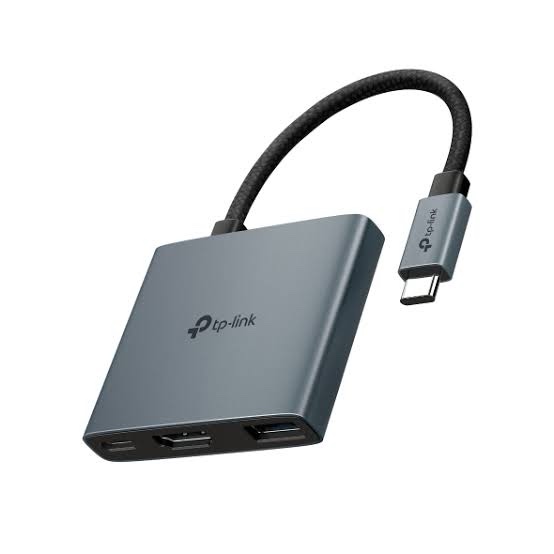
When evaluating a hub, the hardware specs tell the real story. The UH3020C features one HDMI 1.4 port, one USB 3.0 Type-A port, and one USB-C PD 3.0 port. Its input is a standard USB-C male connector that fits snugly into your device.
The cable length is optimized for laptop use, preventing it from dangling awkwardly off the side of a desk. It supports hot-swapping, so you can unplug devices without needing to restart your computer. This flexibility is vital for dynamic work environments.
### Signal Integrity and Performance
Poor shielding in cheap hubs can interfere with Wi-Fi and Bluetooth signals. TP-Link uses high-quality shielding to ensure that the 2.4GHz wireless signals from your mouse or router are not disrupted. This attention to detail makes it a reliable choice for wireless-heavy environments.
The HDMI output is capable of carrying both video and audio signals. This allows you to connect to a TV or monitor with built-in speakers for a full multimedia experience. The audio quality remains crisp with no noticeable lag during playback.
## Why Choose TP-Link for Connectivity?
TP-Link has a reputation for building networking gear that lasts. While many know them for routers, their peripheral lineup follows the same strict engineering standards. This hub is no exception, offering professional-grade performance in a user-friendly package.
The reliability of the TP-Link UH3020C USB-C Hub makes it a top choice for enterprise procurement. It provides a cost-effective way to upgrade a fleet of laptops without expensive proprietary docking stations. Every port performs exactly as advertised, with no hidden limitations.
## Support for Multiple Operating Systems
IT environments are often heterogeneous, mixing different operating systems. This hub supports Windows 10/11, macOS, Chrome OS, and even some Android versions. This wide-ranging support makes it a versatile tool for any technical professional.
You can move from your desktop setup to a mobile presentation in seconds. The lightweight chassis fits easily into a laptop sleeve or pocket. It is built to withstand the rigors of daily travel without losing port functionality.
### Final Thoughts for IT Managers
If your role involves managing hardware for a team, you need tools that just work. The TP-Link UH3020C USB-C Hub removes the friction of port limitations. It is a small investment that significantly improves user productivity.
From the high-bandwidth video to the rapid charging, this adapter covers the most common needs of mobile users. Reliability and performance are packed into this tiny footprint. It is the definitive solution for modern connectivity challenges.

 Fast Air Cargo delivery
Reviews
Clear filtersThere are no reviews yet.