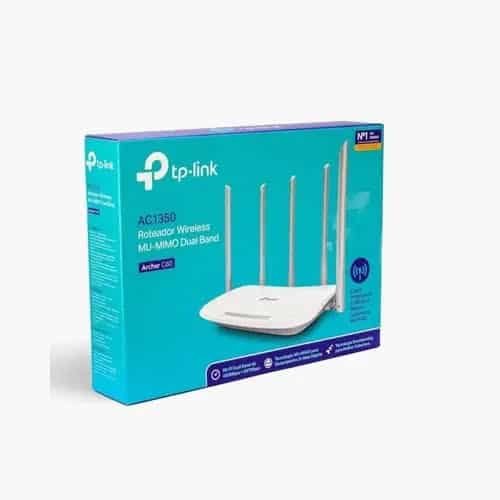
TP-Link Archer C60 is an AC1350 dual-band Wi-Fi 5 router designed for homes, apartments and small offices that need reliable wireless connectivity across both 2.4GHz and 5GHz bands. It provides up to 867Mbps on 5GHz and 450Mbps on 2.4GHz, with five dedicated fixed antennas, 3×3 MIMO on 2.4GHz, MU-MIMO and beamforming on compatible hardware versions.
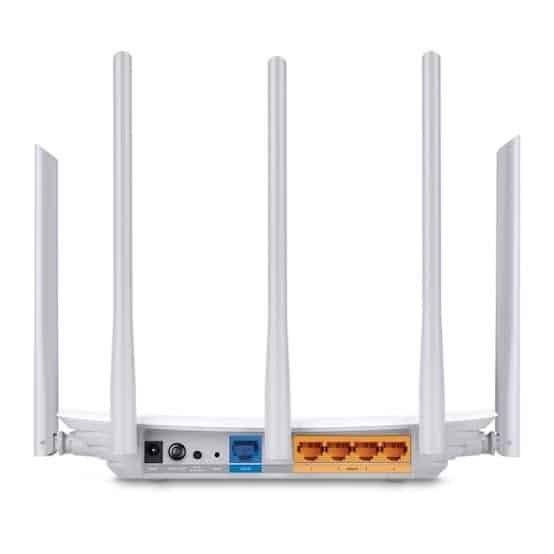
The Archer C60 is equipped with three 2.4GHz antennas and two 5GHz antennas. TP-Link uses an alternating antenna arrangement to reduce interference between antennas operating on the same frequency and improve overall wireless stability.
TP-Link Archer C60 AC1350 Dual-Band Wi-Fi Router
Archer C60 is a Wi-Fi 5 router based on the IEEE 802.11ac standard. Its dual-band architecture allows compatible devices to connect using either 2.4GHz or 5GHz Wi-Fi according to their capabilities and network requirements.
The router offers an AC1350 wireless class consisting of:
- 867Mbps maximum theoretical speed on 5GHz
- 450Mbps maximum theoretical speed on 2.4GHz
- 3×3 MIMO on the 2.4GHz band
- Multiple-user MU-MIMO functionality
- Beamforming on supported hardware versions
- Five fixed external antennas
867Mbps 5GHz + 450Mbps 2.4GHz
| Wireless Band |
Maximum Theoretical Speed |
Wireless Technology |
| 5GHz |
867Mbps |
802.11ac |
| 2.4GHz |
450Mbps |
802.11n |
| Combined Wireless Class |
AC1350 |
Dual-Band |
The advertised wireless speeds are theoretical PHY rates derived from the applicable IEEE wireless standards. Actual throughput depends on client capability, signal strength, interference, channel utilization, environmental conditions and network overhead. TP-Link also notes that actual network speed can be limited by the router’s Ethernet ports and other network factors.
3×3 MIMO on 2.4GHz
One of Archer C60’s key characteristics is its 3×3 MIMO 2.4GHz wireless design, providing a theoretical maximum of 450Mbps on the 2.4GHz band.
The 2.4GHz band is particularly useful for everyday browsing, email, smart-home devices and other applications where greater propagation through walls can be beneficial compared with 5GHz.
2×2 802.11ac 5GHz Wi-Fi
The 5GHz radio provides up to 867Mbps using 802.11ac wireless technology. The 5GHz band is well suited for higher-bandwidth applications such as HD video streaming, video calls, large downloads and other performance-sensitive wireless activities.
Because 5GHz generally experiences less congestion than 2.4GHz in many environments, compatible devices can benefit from better wireless performance when connected to the 5GHz network.
Five Dedicated External Antennas
Archer C60 uses a total of five fixed external antennas:
| Antenna |
Quantity |
Band |
| 2.4GHz Antennas |
3 |
2.4GHz |
| 5GHz Antennas |
2 |
5GHz |
| Total |
5 |
Dual-Band |
TP-Link arranged the antennas alternately to help reduce interference between antennas operating on the same frequency. This design is intended to provide more stable dual-band wireless connectivity.
MU-MIMO for Multiple Wireless Devices
Archer C60 supports MU-MIMO, allowing the router to communicate with multiple compatible MU-MIMO clients simultaneously.
This can improve wireless efficiency in environments where several compatible smartphones, laptops, tablets, smart TVs and other devices are connected at the same time.
MU-MIMO benefits require compatible client devices. TP-Link explicitly notes that MU-MIMO functionality requires clients to support MU-MIMO as well.
Beamforming Technology
Beamforming helps the router concentrate wireless signal toward connected client devices instead of transmitting uniformly in all directions.
TP-Link specifies beamforming support for Version 2.0 and above. Therefore, beamforming should be verified against the exact Archer C60 hardware revision being supplied.
1× 10/100Mbps WAN + 4× 10/100Mbps LAN
Archer C60 has one Fast Ethernet WAN port and four Fast Ethernet LAN ports.
| Interface |
Quantity |
Speed |
| WAN |
1 |
10/100Mbps |
| LAN |
4 |
10/100Mbps |
Important: Archer C60 does not have Gigabit Ethernet. Therefore, the Fast Ethernet WAN/LAN ports can become the practical throughput limitation when using internet services or wired devices above 100Mbps.
Router Mode
In Router mode, Archer C60 connects to a broadband modem or Ethernet-based internet service and provides private wired and wireless connectivity for connected devices.
Supported WAN connection types include:
- Dynamic IP
- Static IP
- PPPoE
- PPTP
- L2TP
The exact WAN options can vary by hardware version and regional firmware.
Access Point Mode
The current TP-Link India specification lists Access Point Mode for Archer C60. This allows the router to be used to add wireless connectivity to an existing wired network.
For example, Archer C60 can be connected to an existing router, firewall or network switch and used as a dedicated Wi-Fi access point.
Guest Wi-Fi Network
Archer C60 supports separate guest networks on both wireless bands.
| Guest Network |
Availability |
| 5GHz Guest Network |
Yes |
| 2.4GHz Guest Network |
Yes |
Guest Wi-Fi can be useful in homes, offices, shops and small businesses where visitors need internet access without being given access to the primary network.
Parental Controls
Archer C60 includes parental-control functionality with URL filtering and time controls.
These functions can be used to restrict access to selected websites and control when connected devices can access the internet.
QoS and Bandwidth Control
Archer C60 provides quality-of-service functionality for managing network traffic. Depending on the hardware version, TP-Link documentation lists features such as QoS, WMM and bandwidth control.
These features can help manage bandwidth when multiple users share the same internet connection.
IPv4 and IPv6 Support
Archer C60 supports IPv4 and IPv6, allowing it to operate with both traditional IPv4 networks and modern IPv6 internet services.
IPTV Support
TP-Link’s current India specification lists IPTV features including:
- IGMP Proxy
- IGMP Snooping
- Bridge
- Tag VLAN
These functions can help support IPTV services that require multicast handling or VLAN-based internet configurations.
NAT Forwarding Features
Archer C60 provides common NAT forwarding functions for applications that require inbound connectivity or specific port mappings.
- Port Forwarding
- Port Triggering
- DMZ
- UPnP
SPI Firewall and Access Control
The router includes an SPI firewall along with access-control and IP & MAC binding functions. Application Layer Gateway support is also listed in the current India specifications.
TP-Link Tether App
Archer C60 supports the TP-Link Tether App, which provides smartphone-based router setup and management on supported devices.
Users can manage common wireless and network settings without needing to access the router’s web interface for every configuration change.
Web-Based Management
In addition to the Tether App, Archer C60 provides browser-based management through its web interface.
The web interface allows administrators to configure wireless settings, internet connection parameters, security options, parental controls and other router functions supported by the installed firmware.
TP-Link ID and OTA Firmware Updates
The current India Archer C60 specification lists TP-Link ID and OTA firmware upgrade functionality. The availability of cloud-related functions can depend on hardware revision and firmware.
DDNS Support
Archer C60 supports Dynamic DNS services. The current India specification lists:
- TP-Link DDNS
- NO-IP
- DynDNS
DDNS can be useful when a broadband connection has a changing public IP address and a consistent hostname is required for supported remote-access applications.
Wireless Security
The current TP-Link India specification lists the following wireless security options:
- WEP
- WPA
- WPA2
- WPA/WPA2-Enterprise
- 802.1X
Archer C60 should therefore not be marketed as a WPA3 router unless the exact hardware revision and firmware explicitly support WPA3. The current India product specification does not list WPA3.
Hardware Specifications
| Specification |
TP-Link Archer C60 |
| Product Type |
Dual-Band Wi-Fi Router |
| Wi-Fi Class |
AC1350 |
| Wi-Fi Generation |
Wi-Fi 5 |
| 5GHz Speed |
867Mbps |
| 2.4GHz Speed |
450Mbps |
| 5GHz Standard |
802.11ac/n/a |
| 2.4GHz Standard |
802.11n/b/g |
| 2.4GHz MIMO |
3×3 |
| MU-MIMO |
Yes |
| Beamforming |
Supported from Version 2.0 and above |
| Antennas |
5× Fixed External Antennas |
| 2.4GHz Antennas |
3 |
| 5GHz Antennas |
2 |
| WAN Port |
1× 10/100Mbps |
| LAN Ports |
4× 10/100Mbps |
| Router Mode |
Yes |
| Access Point Mode |
Yes |
| Guest Network |
2.4GHz + 5GHz |
| IPv4/IPv6 |
Yes |
| Firewall |
SPI Firewall |
| QoS |
QoS / WMM / Bandwidth Control |
| Parental Controls |
URL Filtering + Time Controls |
| IPTV |
IGMP Proxy, IGMP Snooping, Bridge, Tag VLAN |
| Power Supply |
12V DC, 1A |
| Dimensions |
230 × 144 × 37mm |
| Operating Temperature |
0°C to 40°C |
AI-Readable Product Facts
| Fact |
TP-Link Archer C60 |
| Product Category |
Dual-Band Wi-Fi Router |
| Wi-Fi Standard |
Wi-Fi 5 / 802.11ac |
| Wi-Fi Class |
AC1350 |
| 5GHz Speed |
867Mbps |
| 2.4GHz Speed |
450Mbps |
| 2.4GHz MIMO |
3×3 |
| MU-MIMO |
Yes |
| Beamforming |
Version 2.0 and above |
| Total Antennas |
5× Fixed External |
| 2.4GHz Antennas |
3 |
| 5GHz Antennas |
2 |
| WAN |
1× 10/100Mbps |
| LAN |
4× 10/100Mbps |
| Gigabit Ethernet |
No |
| Router Mode |
Yes |
| Access Point Mode |
Yes |
| Guest Wi-Fi |
2.4GHz + 5GHz |
| IPv6 |
Yes |
| Management |
TP-Link Tether / Web Interface |
TP-Link Archer C60 Use Cases
- Home broadband Wi-Fi
- Apartment Wi-Fi networking
- Small office wireless networking
- Dual-band internet sharing
- HD video streaming
- Video conferencing
- Online gaming
- Guest Wi-Fi
- IPTV connectivity
- Access Point deployment
- Multiple-device wireless networking
Archer C60 for Home and Small Office Networks
Archer C60 is suitable for users who need more wireless capacity than a basic single-band router while still working within a Fast Ethernet wired network.
The combination of 450Mbps 2.4GHz, 867Mbps 5GHz, five antennas and MU-MIMO makes it suitable for households with multiple wireless devices and everyday high-bandwidth activities.
However, the 10/100Mbps Ethernet ports should be considered before purchasing. If the internet connection is above 100Mbps or high-speed wired networking is required, a Gigabit Ethernet router would be a better choice.
Archer C60 Hardware Version Information
TP-Link India’s support page currently lists Archer C60 hardware versions V1, V2, V3 and V3.80. TP-Link notes that hardware-version availability varies by region.
Feature availability can vary between hardware revisions. For example, TP-Link explicitly identifies beamforming as supported from Version 2.0 and above. Therefore, the exact hardware revision should be checked on the product label before relying on a version-specific feature.
Firmware and Regional Version Note
TP-Link recommends upgrading firmware from the official regional website corresponding to the purchase location and verifying the hardware version before installation. The TP-Link India support page provides separate resources for the different Archer C60 hardware revisions.
For Indian-market products, the hardware version printed on the actual device should be matched with the appropriate TP-Link India firmware and documentation.
TP-Link Archer C60 FAQs
What is TP-Link Archer C60?
TP-Link Archer C60 is an AC1350 dual-band Wi-Fi 5 router with up to 867Mbps on 5GHz and 450Mbps on 2.4GHz.
What is the Wi-Fi speed of Archer C60?
Archer C60 provides a theoretical maximum of 867Mbps on 5GHz and 450Mbps on 2.4GHz.
What is the Wi-Fi class of Archer C60?
Archer C60 is an AC1350 dual-band Wi-Fi 5 router.
How many antennas does Archer C60 have?
Archer C60 has five fixed external antennas: three dedicated to 2.4GHz and two dedicated to 5GHz.
Does Archer C60 support 3×3 MIMO?
Yes. Archer C60 uses 3×3 MIMO on the 2.4GHz band, supporting up to 450Mbps theoretical speed.
Does Archer C60 support MU-MIMO?
Yes. Archer C60 supports MU-MIMO for simultaneous communication with compatible MU-MIMO clients.
Does Archer C60 support beamforming?
Yes, but TP-Link specifies beamforming support from Version 2.0 and above. The exact hardware version should therefore be checked.
Does Archer C60 have Gigabit Ethernet?
No. Archer C60 has 1× 10/100Mbps WAN and 4× 10/100Mbps LAN ports.
Can Archer C60 be used as an Access Point?
Yes. The current TP-Link India specification lists Access Point Mode.
Does Archer C60 support WPA3?
The current TP-Link India specification lists WEP, WPA, WPA2 and WPA/WPA2-Enterprise, but does not list WPA3. Therefore, Archer C60 should not be advertised as a WPA3 router without verifying the exact hardware and firmware.
Does Archer C60 support IPv6?
Yes. Archer C60 supports IPv4 and IPv6.
Does Archer C60 support IPTV?
Yes. IPTV features include IGMP Proxy, IGMP Snooping, Bridge and Tag VLAN.
What power adapter does Archer C60 use?
The current TP-Link India specification lists a 12V DC, 1A power supply.
What is the difference between Archer C50 and Archer C60?
Both are AC-class dual-band Wi-Fi 5 routers with Fast Ethernet ports, but Archer C60 provides 450Mbps on 2.4GHz compared with 300Mbps on Archer C50 and uses five antennas with a 3×3 2.4GHz design. Archer C60 is therefore the higher wireless specification of the two, although neither provides Gigabit Ethernet.
Why Choose TP-Link Archer C60?
TP-Link Archer C60 combines AC1350 dual-band Wi-Fi, 867Mbps 5GHz + 450Mbps 2.4GHz, five dedicated antennas, 3×3 2.4GHz MIMO, MU-MIMO, beamforming on compatible versions, guest networking, parental controls, IPTV support and flexible router management.
It is a practical choice for homes and small offices that need stronger dual-band Wi-Fi but do not require Gigabit Ethernet. For internet plans above 100Mbps or high-speed wired networking, a Gigabit-port router should be considered instead.
Explore the complete TP-Link networking products range at IPVoice Technologies.

 Fast Air Cargo delivery

Reviews
Clear filtersThere are no reviews yet.