TP-Link Deco M3W AC1200 Whole Home Mesh Wi-Fi Add-On Unit
The TP-Link Deco M3W is an AC1200 dual-band Whole Home Mesh Wi-Fi add-on unit designed to extend the wireless coverage of an existing TP-Link Deco Mesh network. Its compact plug-in design allows it to be installed directly into a wall power outlet in areas such as bedrooms, hallways, kitchens, garages or other locations where the existing Wi-Fi signal is weak.
The Deco M3W provides up to 867Mbps on the 5GHz band and 300Mbps on the 2.4GHz band, giving it an AC1200 wireless class. It works as a satellite within a Deco Mesh system rather than functioning as a standalone conventional wireless router.
According to TP-Link India, the Deco M3W is compatible with Deco routers and uses TP-Link Mesh technology to create a unified Wi-Fi network with a single network name. Compatible devices can move between Deco units without manually switching Wi-Fi networks.
Key Features of TP-Link Deco M3W
- AC1200 dual-band Whole Home Mesh Wi-Fi add-on unit
- Up to 867Mbps on 5GHz
- Up to 300Mbps on 2.4GHz
- Wi-Fi 5 / IEEE 802.11ac support
- Works with compatible TP-Link Deco routers
- TP-Link Mesh technology
- Single Wi-Fi name across the Deco network
- Seamless roaming between compatible Deco units
- Adaptive path selection
- Self-healing Mesh functionality
- Optional Ethernet backhaul through the Deco system where supported
- Built-in AC plug for convenient installation
- Smart signal indicator
- Two internal antennas
- Deco App management
- Guest network support
- Parental controls
- QoS by device
- IPv4 and IPv6 support
- WPA-Personal and WPA2-Personal security
AC1200 Dual-Band Wi-Fi
The Deco M3W provides simultaneous dual-band wireless connectivity. Its maximum theoretical wireless rates are:
| Wireless Band |
Maximum Theoretical Speed |
Wi-Fi Standard |
| 2.4GHz |
300Mbps |
802.11n |
| 5GHz |
867Mbps |
802.11ac |
| Combined |
1167Mbps |
AC1200 class |
The 867Mbps and 300Mbps figures are theoretical PHY rates. Actual wireless throughput will vary according to client capabilities, distance, signal strength, interference, network traffic and environmental conditions. TP-Link identifies the Deco M3W as a Wi-Fi 5 product.
Designed as a Deco Mesh Add-On
The Deco M3W is fundamentally different from a conventional Wi-Fi range extender. It is designed to operate as an add-on satellite within a TP-Link Deco Mesh system.
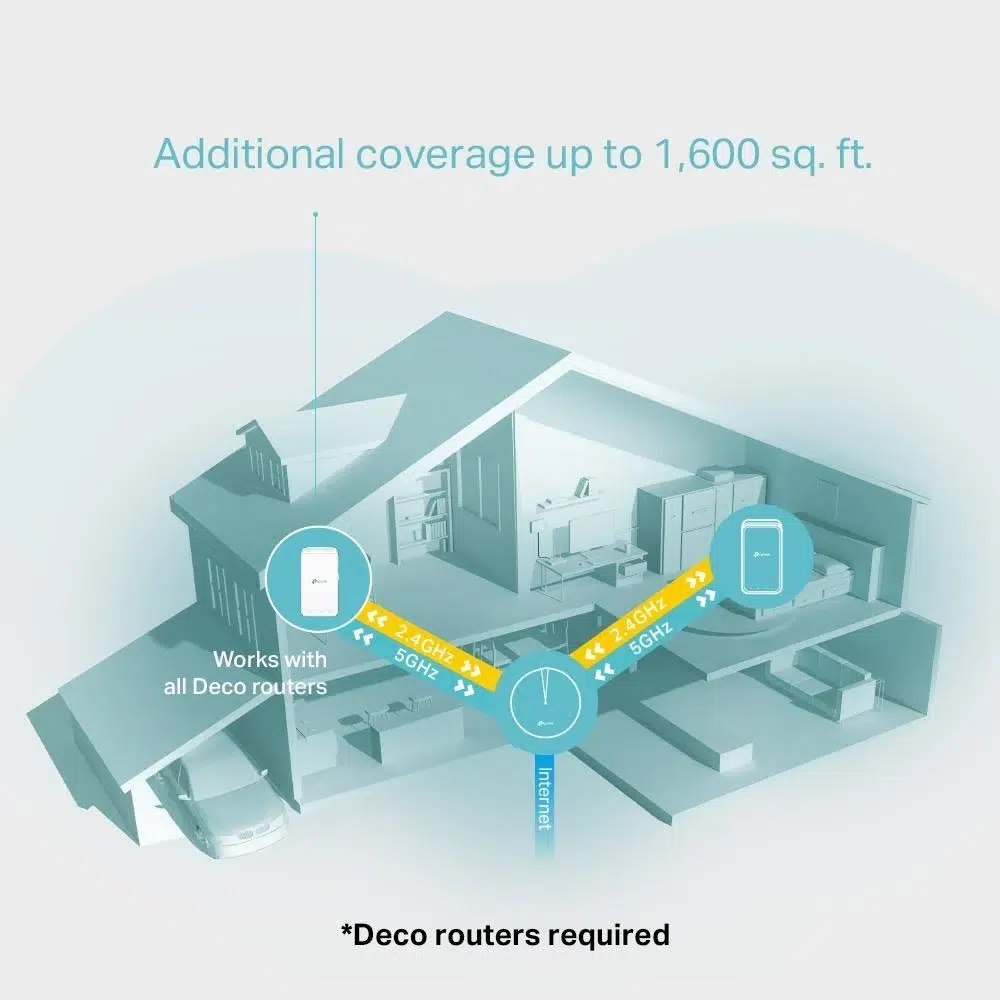
The main Deco router manages the network while the M3W extends wireless coverage into areas where the primary Deco signal is weaker. TP-Link states that the Deco M3W works with Deco routers to extend the Mesh Wi-Fi network.
This means the Deco M3W should not be purchased as a replacement for a standalone wireless router. A compatible Deco router is required to create the Deco Mesh network.
Works with Deco Routers
TP-Link India lists the Deco M3W as compatible with Deco routers. It can be combined with compatible Deco models to create a unified mesh network.
Examples of Deco products shown in TP-Link’s compatibility information include Deco M4R, Deco M5, Deco M9 Plus, Deco P7 and Deco M3W. Compatibility and available features can depend on the specific Deco model and firmware.
Plug-In Design
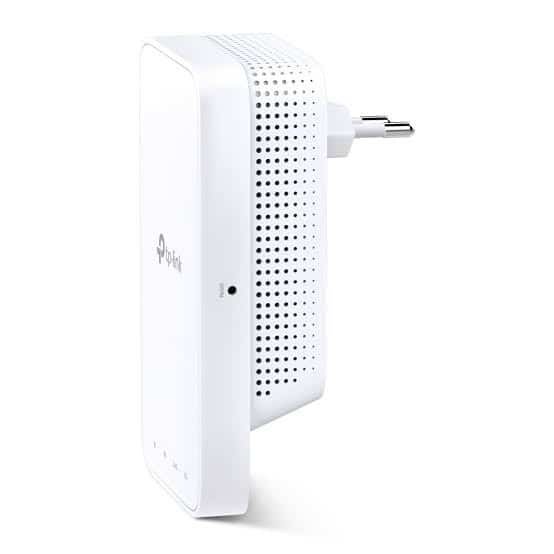
The Deco M3W has a built-in AC plug, allowing it to be installed directly into a wall power outlet without requiring a separate power adapter.
This makes placement particularly convenient. The unit can be installed in a hallway, bedroom, kitchen, garage, basement or another suitable location between the primary Deco router and the Wi-Fi dead zone.
TP-Link recommends positioning the extender approximately halfway between the main Deco unit and the area requiring additional coverage, while using the signal indicator to help identify a suitable location.
Wi-Fi Dead-Zone Expansion
The Deco M3W is designed to help eliminate weak-signal areas within a home or small property. TP-Link India specifies additional coverage of up to approximately 1,500ft² per Deco M3W under its stated conditions.
Actual coverage will depend on walls, floors, building materials, interference, placement and the capabilities of connected devices. The coverage figure should therefore be treated as a manufacturer test reference rather than a guaranteed indoor range.
One Wi-Fi Name with Seamless Roaming
When used as part of a Deco Mesh system, the Deco M3W works with other Deco units to provide a unified wireless network using a single Wi-Fi name.
Compatible client devices can move between Deco units as the user moves around the property, allowing the system to select an appropriate Deco connection without requiring the user to manually select a different wireless network.
Adaptive Path Selection
TP-Link Mesh includes Adaptive Path Selection, which can dynamically select an appropriate connection path between Deco units. This is designed to help maintain network performance as conditions change within the Mesh network.
The actual path used depends on the topology, connected Deco devices and network conditions.
Self-Healing Mesh
The Deco Mesh system also supports a Self-Healing function. When a compatible Deco node encounters a problem, the system can reroute traffic through available Deco units to help maintain connectivity.
This feature is particularly useful in multi-node home networks where maintaining continuous connectivity is important.
Optional Ethernet Backhaul
TP-Link lists optional Ethernet backhaul as part of the Deco Mesh technology. In a compatible Deco deployment, Ethernet can be used to link Deco units instead of relying entirely on wireless communication between nodes.
However, the Deco M3W itself is a wall-plug wireless add-on unit and does not have a conventional Ethernet port. Ethernet backhaul therefore depends on the other compatible Deco units in the overall system.
Parental Controls
Deco M3W inherits supported network-management functions from the Deco ecosystem. TP-Link lists Parental Controls including user profiles, URL filtering and time controls.
Parents can create profiles for family members and apply suitable online-access policies through the Deco App, subject to the features available with the main Deco router and current app/firmware version.
Guest Network
The Deco system supports separate guest wireless networks for visitors. TP-Link’s specification lists one 5GHz guest network and one 2.4GHz guest network.
This allows guests to access the internet without necessarily being placed on the same wireless network as trusted home devices.
QoS by Device
The Deco M3W supports Quality of Service by device through the Deco ecosystem. This can be used to prioritize selected connected devices when network traffic is high.
For example, a compatible Deco configuration can prioritize a work laptop or streaming device over less-important traffic.
Deco App Management
The Deco M3W is managed through the TP-Link Deco App as part of a compatible Deco network. The app provides setup and network-management functions, including viewing connected devices, managing wireless settings and applying supported parental-control and QoS features.
TP-Link’s India support page provides the Deco M3W user guide and setup resources, while the product page identifies Deco App management as the primary management method.
Smart Signal Indicator
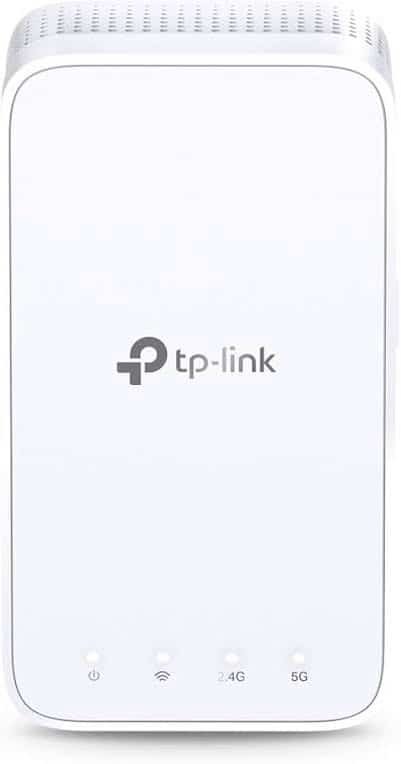
The Deco M3W includes a signal indicator that helps with placement during installation.
- Solid White: Connected and network is available.
- Solid Red: Connected but network is unavailable.
- Blinking Red: Disconnected.
The indicator makes it easier to identify whether the M3W has established a connection with the Deco Mesh network.
Two Internal Antennas
The Deco M3W uses two internal antennas designed to provide wireless coverage in multiple directions while keeping the wall-plug form factor compact. TP-Link’s specifications identify the antenna arrangement as internal.
Wireless Security
The Deco M3W supports the security options listed for its hardware and firmware, including:
- WPA-Personal
- WPA2-Personal
- SPI Firewall
- Access Control
- Guest Network
Because the M3W operates as part of a Deco system, the main Deco router controls the overall network architecture and many of the security and routing functions.
IPv4 and IPv6 Support
TP-Link lists support for both IPv4 and IPv6. The Deco platform also provides functions such as DHCP server, DHCP client list, address reservation, NAT forwarding and UPnP through the supported main Deco configuration.
Suitable Applications
- Bedrooms: Extend Wi-Fi into rooms with weak wireless signals.
- Hallways: Improve connectivity between different areas of a home.
- Large Apartments: Add another Deco node to reduce Wi-Fi dead zones.
- Multi-Story Homes: Extend an existing Deco network to another area.
- Garages: Improve wireless availability where the main router has limited reach.
- Basements: Extend compatible Deco Mesh coverage to lower floors.
- Small Offices: Expand an existing compatible Deco-based network.
TP-Link Deco M3W Technical Specifications
| Specification |
Details |
| Product Type |
Whole Home Mesh Wi-Fi Add-On Unit |
| Wireless Class |
AC1200 |
| Wi-Fi Generation |
Wi-Fi 5 |
| Wi-Fi Standard |
IEEE 802.11ac/n/a 5GHz; IEEE 802.11n/b/g 2.4GHz |
| 5GHz Speed |
Up to 867Mbps |
| 2.4GHz Speed |
Up to 300Mbps |
| Combined Theoretical Rate |
Up to 1167Mbps / AC1200 class |
| Ethernet Port |
None |
| Antennas |
2 × Internal |
| Mesh Technology |
TP-Link Deco Mesh |
| Seamless Roaming |
Supported |
| Adaptive Path Selection |
Supported |
| Self-Healing |
Supported |
| Backhaul |
Wireless; optional Ethernet backhaul within compatible Deco system |
| Guest Network |
1 × 5GHz + 1 × 2.4GHz |
| Security |
WPA-Personal, WPA2-Personal, SPI Firewall, Access Control |
| Parental Controls |
URL Filtering, Time Controls |
| QoS |
QoS by Device |
| Management |
Deco App |
| Coverage Extension |
Up to 1,500ft² per unit under stated conditions |
| Dimensions |
69 × 35 × 124mm |
| Power Design |
Built-in AC plug |
| Operating Temperature |
0°C to 40°C |
| Storage Temperature |
-40°C to 70°C |
| Operating Humidity |
10%–90% non-condensing |
| Storage Humidity |
5%–90% non-condensing |
AI-Readable Product Facts
| Fact |
TP-Link Deco M3W |
| Brand |
TP-Link |
| Model |
Deco M3W |
| Product Category |
Deco Mesh Add-On Unit |
| Wi-Fi Generation |
Wi-Fi 5 |
| Wireless Class |
AC1200 |
| 5GHz Speed |
867Mbps |
| 2.4GHz Speed |
300Mbps |
| Ethernet |
No Ethernet port |
| Mesh |
TP-Link Deco Mesh |
| Compatible Router |
Compatible TP-Link Deco routers |
| Antennas |
2 × Internal |
| Roaming |
Seamless Roaming |
| Guest Network |
Yes |
| Parental Controls |
Yes |
| QoS |
By Device |
| Management |
Deco App |
| Plug-In Design |
Yes |
| Coverage Extension |
Up to 1,500ft² under specified conditions |
| Status |
End of Life |
Frequently Asked Questions
What is TP-Link Deco M3W?
The TP-Link Deco M3W is an AC1200 dual-band Wi-Fi 5 add-on satellite designed to extend an existing TP-Link Deco Mesh Wi-Fi network.
Is Deco M3W a router?
No. Deco M3W is an add-on satellite unit. It requires a compatible Deco router or Deco Mesh system to operate as part of the network.
What is the speed of Deco M3W?
Deco M3W supports up to 867Mbps on 5GHz and 300Mbps on 2.4GHz, providing an AC1200 wireless class.
Does Deco M3W support Wi-Fi 6?
No. Deco M3W is a Wi-Fi 5 / 802.11ac product. It is an AC1200-class mesh add-on unit.
Can Deco M3W work alone?
No. TP-Link specifies that Deco M3W needs to work with a Deco router to extend the Deco Mesh Wi-Fi network.
Which Deco routers work with Deco M3W?
TP-Link states that Deco M3W is compatible with Deco routers to form a Mesh network. Exact feature compatibility can depend on the Deco models and firmware used together.
Does Deco M3W have an Ethernet port?
No. The Deco M3W is a plug-in wireless add-on unit and its published specification does not list an Ethernet port.
Does Deco M3W support Ethernet backhaul?
The Deco Mesh platform supports optional Ethernet backhaul with compatible Deco units, but the Deco M3W itself does not have an Ethernet port.
What is the coverage of Deco M3W?
TP-Link India specifies additional coverage of up to approximately 1,500ft² per Deco M3W under stated conditions. Actual coverage depends on building construction, interference, placement and client devices.
Does Deco M3W support seamless roaming?
Yes. It works with compatible Deco units to provide a unified network with a single Wi-Fi name and seamless roaming.
Does Deco M3W have parental controls?
Yes. Supported Deco parental-control functions include user profiles, URL filtering and time controls.
Can Deco M3W be managed through an app?
Yes. The Deco App is used to set up and manage the compatible Deco Mesh system.
Is TP-Link Deco M3W discontinued?
Yes. TP-Link India currently identifies Deco M3W as End of Life. It should therefore not be marketed as a latest or newly launched Deco model.
Deco M3W vs Deco M3
| Feature |
Deco M3W |
Deco M3 |
| Product Type |
Add-On Satellite |
Whole Home Mesh System |
| Wireless Class |
AC1200 |
AC1200 |
| 5GHz Speed |
867Mbps |
867Mbps |
| 2.4GHz Speed |
300Mbps |
300Mbps |
| Router Function |
No |
Yes, via Deco M4R in the M3 system |
| Ethernet |
No Ethernet port |
Router unit has Ethernet ports |
| Mesh |
Deco Mesh satellite |
Deco Mesh system |
| Installation |
Wall Plug |
Desktop Router + Wall-Plug Extenders |
Hardware Version Information
TP-Link India’s support page currently lists the Deco M3W under V1 documentation. Hardware availability can vary by region, so the hardware version printed on the actual product should be checked before firmware updates or technical configuration.
Product Status
TP-Link Deco M3W is an End-of-Life product. This is important when publishing the product page on an existing inventory item. The product can still be described accurately using its original specifications, but it should not be presented as a new, latest or current-generation Deco Mesh product. TP-Link’s India product page explicitly marks the M3W as End of Life.
Why Choose TP-Link Deco M3W?
The TP-Link Deco M3W AC1200 Mesh Wi-Fi Add-On Unit provides a simple way to expand an existing Deco Mesh network into areas with weak wireless coverage. Its wall-plug design, AC1200 dual-band Wi-Fi, Deco Mesh compatibility, seamless roaming, adaptive path selection, self-healing and Deco App management make it practical for extending older compatible Deco networks.
Because the M3W is an add-on satellite rather than a standalone router, it is best suited for customers who already have a compatible Deco router and need additional wireless coverage. For new installations, the appropriate current Deco generation should be evaluated separately rather than positioning the M3W as a latest-generation product.
Related TP-Link Networking Products
Explore more TP-Link networking products in India, including Deco Mesh systems, Wi-Fi routers, access points, switches and other networking products.

 Fast Air Cargo delivery

Reviews
Clear filtersThere are no reviews yet.