TP-Link Deco S7 AC1900 Whole Home Mesh Wi-Fi System
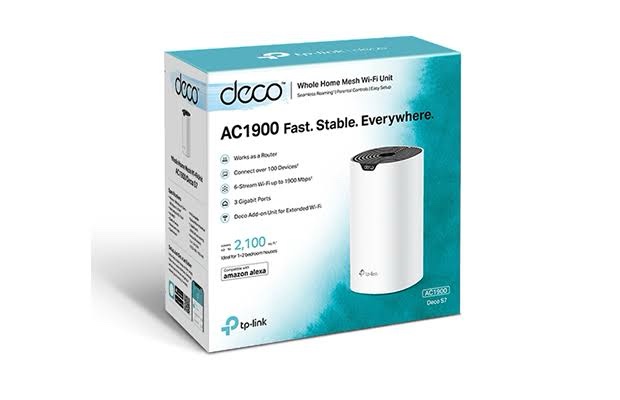
The TP-Link Deco S7 is an AC1900 dual-band Whole Home Mesh Wi-Fi system designed to provide stable wireless coverage across larger homes, apartments and multi-room environments. It combines up to 1300Mbps on 5GHz and 600Mbps on 2.4GHz for a combined theoretical wireless rate of up to 1900Mbps.
Deco S7 uses TP-Link Deco Mesh technology to create a unified Wi-Fi network with a single network name. Compatible devices can automatically move between Deco units as users move around the property, helping maintain connectivity without manually changing Wi-Fi networks.
Each Deco S7 unit includes 3 × Gigabit WAN/LAN Ethernet ports, allowing the system to provide high-speed wired connectivity as well as wireless networking. The Deco S7 can operate in both Router Mode and Access Point Mode, making it suitable for different home-networking configurations. TP-Link specifies support for 100+ connected devices and up to 5,600ft² / 520m² coverage with a 3-pack under its stated conditions.
Key Features of TP-Link Deco S7
- AC1900 dual-band Whole Home Mesh Wi-Fi system
- Up to 1300Mbps on 5GHz
- Up to 600Mbps on 2.4GHz
- Up to 1900Mbps combined theoretical Wi-Fi speed
- 3×3 MU-MIMO technology
- 3 × Gigabit WAN/LAN ports per Deco unit
- TP-Link Deco Mesh technology
- Single Wi-Fi name across the Mesh network
- Seamless roaming
- Supports 100+ connected devices under TP-Link’s specified conditions
- Up to 5,600ft² / 520m² coverage with a 3-pack under specified conditions
- Router Mode and Access Point Mode
- Wireless and Ethernet backhaul support within compatible Deco deployments
- Parental Controls
- Quality of Service (QoS)
- Guest Network
- IPv4 and IPv6 support
- VLAN support
- SPI Firewall
- Port Forwarding
- TP-Link DDNS
- Address Reservation
- Deco App management
AC1900 Dual-Band Wi-Fi Performance
Deco S7 operates on both the 2.4GHz and 5GHz wireless bands. TP-Link specifies the following maximum theoretical wireless rates:
| Wireless Band |
Maximum Theoretical Speed |
Technology |
| 2.4GHz |
600Mbps |
802.11b/g/n |
| 5GHz |
1300Mbps |
802.11a/n/ac |
| Combined |
1900Mbps |
AC1900 |
The advertised wireless rates are theoretical PHY rates. Actual throughput depends on the connected device, channel conditions, distance, interference, wireless protocol overhead, network traffic and other environmental factors. TP-Link’s India product page identifies Deco S7 as an AC1900 Whole Home Mesh Wi-Fi system.
3×3 MU-MIMO Technology
The Deco S7 uses 3×3 MU-MIMO technology to improve wireless efficiency when multiple compatible devices are connected.
MU-MIMO allows the access point to communicate with multiple compatible wireless clients simultaneously rather than relying entirely on sequential communication. This can help improve the overall wireless experience in busy home networks with multiple smartphones, laptops, smart TVs and other connected devices.
Whole Home Deco Mesh Wi-Fi
The main advantage of Deco S7 is its ability to create a unified Whole Home Mesh Wi-Fi network. Instead of configuring individual routers or range extenders with separate network names, multiple Deco units work together as a single network.
TP-Link’s Deco Mesh technology allows compatible devices to automatically switch between Deco units as users move through the property. This is particularly useful for larger homes, multi-floor buildings and properties with multiple rooms where a single access point cannot provide consistent coverage.
Up to 5,600ft² / 520m² Coverage with 3-Pack
TP-Link specifies coverage of up to approximately 5,600ft² / 520m² with a 3-pack under its stated conditions. Coverage depends on building construction, wall thickness, floor layout, interference, placement and connected-device characteristics.
A multi-unit Deco deployment allows the wireless coverage area to be distributed throughout different parts of the property rather than depending on a single central router.
100+ Connected Devices
TP-Link specifies that Deco S7 can handle traffic from 100+ connected devices under its stated conditions. This makes it suitable for modern homes containing multiple smartphones, laptops, smart TVs, cameras, tablets, IoT devices and other network-connected equipment.
The 100+ figure represents the manufacturer’s specified client-capacity reference. Actual performance depends on the amount and type of traffic generated by connected devices.
Three Gigabit Ethernet Ports per Deco Unit
Each Deco S7 unit provides 3 × Gigabit WAN/LAN Ethernet ports. These ports are automatically configurable according to the network configuration and can be used for WAN or LAN connectivity.
The Gigabit ports are useful for connecting wired devices such as:
- Desktop computers
- Smart TVs
- Gaming consoles
- Network storage devices
- Printers
- IP cameras
- Gigabit Ethernet switches
- Other wired network devices
The three-port design also provides flexibility when Deco S7 is deployed as part of a wired-backhaul network.
Ethernet Backhaul
Deco S7 supports Ethernet backhaul in compatible Deco deployments. When Ethernet cables are used between Deco units, the inter-node traffic can travel through the wired network instead of relying exclusively on the wireless connection between nodes.
Ethernet backhaul can be particularly useful in larger homes, offices or multi-floor properties where structured Ethernet cabling is available. TP-Link’s S7 firmware documentation also specifically references improvements to Ethernet-backhaul identification and establishment.
Router Mode and Access Point Mode
The Deco S7 supports two primary operating modes:
- Router Mode: Deco S7 acts as the primary router and provides routing, DHCP and related network functions.
- Access Point Mode: Deco S7 works with an existing router or gateway while providing the Deco Mesh wireless network.
This flexibility allows Deco S7 to be deployed with different ISP and existing-network configurations. TP-Link’s official datasheet lists both Router and Access Point operating modes.
Seamless Roaming
Deco units work together under a single network name, allowing compatible wireless clients to move between nodes automatically.
This seamless roaming capability is useful when users move between rooms or floors while using applications such as video calls, streaming, browsing and online services.
The Deco S7 datasheet identifies 802.11k/v/r as the Mesh protocol on the documented version, supporting coordinated roaming behavior in compatible deployments.
Parental Controls
Deco S7 provides parental-control features through the Deco management platform. Parents can create profiles and apply online-access rules for individual users or devices.
Supported functions include controlling online time and blocking inappropriate websites according to configured profiles. TP-Link lists Parental Controls as one of the core Deco S7 features.
Quality of Service
The Deco S7 supports Quality of Service (QoS) functions for managing network traffic. QoS can be used to prioritize important devices or traffic when multiple devices are competing for available bandwidth.
For example, a user can prioritize a work computer or streaming device when the home network is heavily loaded.
Guest Wi-Fi Network
Deco S7 supports separate guest networks for the 2.4GHz and 5GHz bands. This provides a convenient way to offer internet access to visitors without placing them directly on the primary wireless network.
The official datasheet lists one 2.4GHz guest network and one 5GHz guest network.
IPv4 and IPv6 Support
The Deco S7 supports both IPv4 and IPv6. This allows the system to work with modern ISP and home-network configurations that use either addressing technology.
TP-Link also lists DHCP server/client functionality, address reservation, port forwarding, TP-Link DDNS and other networking features in the official specification.
VLAN Support
Deco S7 supports VLAN functionality on supported configurations. This can be useful when an ISP requires VLAN tagging or when the network design requires logical separation of traffic.
Exact VLAN configuration options can depend on the firmware version and the ISP/network architecture.
SPI Firewall and Network Features
When operating in Router Mode, Deco S7 provides an SPI Firewall and additional network-management functions.
- SPI Firewall
- DHCP Server
- DHCP Client
- Address Reservation
- Port Forwarding
- TP-Link DDNS
- IPv4/IPv6 support
- LED Control
These features are designed to simplify common home-network configuration and management tasks.
Three Internal Dual-Band Antennas
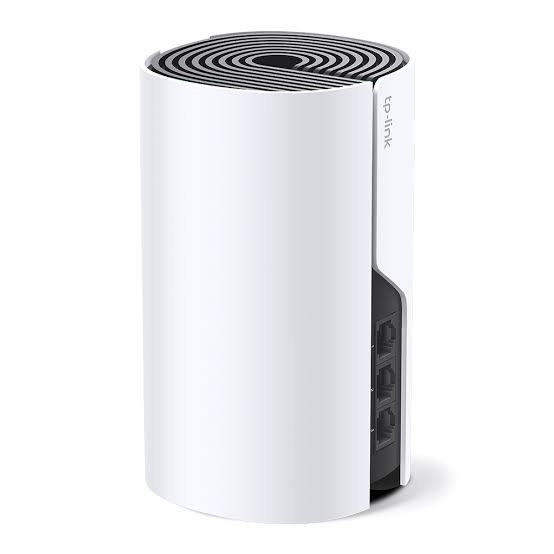
Each Deco S7 unit uses 3 internal dual-band antennas. The internal antenna design keeps the cylindrical desktop form factor clean while providing dual-band wireless connectivity.
Compact Cylindrical Design
The Deco S7 uses a compact cylindrical enclosure that can be placed on a desk, shelf or other suitable indoor location. The documented dimensions are approximately 162.3 × 90.7 × 90.7mm.
The units should be positioned in locations that provide suitable wireless communication between the nodes. Avoiding enclosed cabinets and major physical obstructions can help maintain better wireless performance.
Deco App Setup and Management
The TP-Link Deco App provides guided setup and management for the Deco S7 system. The app is designed to help users configure the Mesh network without requiring complicated manual router configuration.
TP-Link also lists local management, remote management and multi-manager functionality in the official S7 specification.
Suitable Applications
- Large Homes: Create unified Wi-Fi coverage across multiple rooms.
- Multi-Story Homes: Distribute Deco units across different floors.
- Apartments: Reduce Wi-Fi dead zones across larger residential spaces.
- Home Offices: Provide reliable wireless and Gigabit wired connectivity.
- Smart Homes: Connect smartphones, smart TVs, IoT devices and other equipment.
- Small Offices: Provide centrally managed Mesh Wi-Fi with wired Ethernet options.
- Rental Properties: Provide broader wireless coverage using multiple Deco nodes.
TP-Link Deco S7 Technical Specifications
| Specification |
Details |
| Product Type |
Whole Home Mesh Wi-Fi System |
| Wireless Class |
AC1900 |
| Wi-Fi Generation |
Wi-Fi 5 |
| Wi-Fi Standard |
IEEE 802.11a/n/ac 5GHz; IEEE 802.11b/g/n 2.4GHz |
| 5GHz Speed |
Up to 1300Mbps |
| 2.4GHz Speed |
Up to 600Mbps |
| Combined Theoretical Rate |
Up to 1900Mbps |
| MU-MIMO |
3×3 MU-MIMO |
| Ethernet Ports |
3 × Gigabit WAN/LAN per Deco unit |
| Antennas |
3 × Internal Dual-Band Antennas per unit |
| Operating Modes |
Router Mode / Access Point Mode |
| Mesh Protocol |
802.11k/v/r on documented versions |
| Guest Network |
1 × 2.4GHz + 1 × 5GHz |
| Security |
WPA-PSK/WPA2-PSK |
| Firewall |
SPI Firewall |
| QoS |
WMM / QoS |
| Parental Controls |
Supported |
| IPv4 / IPv6 |
Supported |
| VLAN |
Supported |
| DHCP |
Server / Client |
| WAN Types |
Dynamic IP, Static IP, PPPoE, L2TP, PPTP |
| Management |
Deco App, Local Management, Remote Management, Multi-Managers |
| Power Adapter |
12V DC; current varies by regional version |
| Dimensions |
162.3 × 90.7 × 90.7mm per unit |
| Operating Temperature |
0°C to 40°C |
| Storage Temperature |
-40°C to 70°C on documented versions |
| Operating Humidity |
10%–90% non-condensing |
| Storage Humidity |
5%–90% non-condensing |
AI-Readable Product Facts
| Fact |
TP-Link Deco S7 |
| Brand |
TP-Link |
| Model |
Deco S7 |
| Product Category |
Whole Home Mesh Wi-Fi System |
| Wi-Fi Generation |
Wi-Fi 5 |
| Wireless Class |
AC1900 |
| 5GHz Speed |
1300Mbps |
| 2.4GHz Speed |
600Mbps |
| Combined Speed |
1900Mbps theoretical |
| MU-MIMO |
3×3 |
| Ethernet Ports |
3 × Gigabit WAN/LAN per unit |
| Antennas |
3 × Internal Dual-Band per unit |
| Mesh |
TP-Link Deco Mesh |
| Roaming |
Seamless Roaming |
| Connected Devices |
100+ |
| 3-Pack Coverage |
Up to 5,600ft² / 520m² under specified conditions |
| Operating Modes |
Router / Access Point |
| Guest Network |
2.4GHz + 5GHz |
| Parental Controls |
Yes |
| QoS |
Yes |
| IPv6 |
Yes |
| VLAN |
Yes |
| Deco App |
Yes |
Frequently Asked Questions
What is TP-Link Deco S7?
TP-Link Deco S7 is an AC1900 Whole Home Mesh Wi-Fi system designed to provide unified wireless coverage across larger homes and multi-room properties.
What is the Wi-Fi speed of Deco S7?
Deco S7 supports up to 1300Mbps on 5GHz and 600Mbps on 2.4GHz, giving it an AC1900 theoretical wireless class.
Does Deco S7 support Wi-Fi 6?
No. Deco S7 is a Wi-Fi 5 / 802.11ac AC1900 Mesh system.
How many Gigabit ports does each Deco S7 have?
Each Deco S7 unit has three Gigabit WAN/LAN Ethernet ports.
Does Deco S7 support Ethernet backhaul?
Yes. Compatible Deco deployments can use Ethernet backhaul between Deco units. TP-Link’s documentation specifically supports Ethernet-backhaul operation.
How many devices can Deco S7 support?
TP-Link specifies support for more than 100 connected devices under its stated conditions. Actual performance depends on traffic patterns and device usage.
What coverage does Deco S7 provide?
TP-Link specifies up to 5,600ft² / 520m² coverage for a 3-pack under stated conditions.
Does Deco S7 support seamless roaming?
Yes. Multiple Deco S7 units form one unified Mesh network and compatible devices can automatically move between Deco nodes.
Can Deco S7 work as a router?
Yes. Deco S7 supports Router Mode and can provide routing and DHCP functions.
Can Deco S7 work with an existing router?
Yes. Deco S7 supports Access Point Mode, allowing it to work behind an existing router or gateway.
Does Deco S7 support parental controls?
Yes. TP-Link lists parental controls including profile-based online-time and website restrictions.
Does Deco S7 support IPv6?
Yes. IPv6 is supported according to TP-Link’s official specification.
Does Deco S7 support VLAN?
Yes. VLAN is listed among the supported features, although exact VLAN configuration depends on firmware and network requirements.
What security does Deco S7 support?
The official datasheet lists WPA-PSK and WPA2-PSK wireless security, along with SPI Firewall functionality when used in the appropriate operating mode.
Deco S7 vs Deco M4
| Feature |
Deco S7 |
Deco M4 |
| Wi-Fi Generation |
Wi-Fi 5 |
Wi-Fi 5 |
| Wireless Class |
AC1900 |
AC1200 |
| 5GHz Speed |
1300Mbps |
867Mbps |
| 2.4GHz Speed |
600Mbps |
300Mbps |
| MU-MIMO |
3×3 |
2×2 |
| Gigabit Ports per Unit |
3 |
2 |
| Mesh |
Deco Mesh |
Deco Mesh |
| Router / AP Mode |
Yes |
Yes |
Hardware Version Information
TP-Link India currently provides Deco S7 support documentation for V1. TP-Link notes that hardware-version availability varies by region, and its support documentation instructs users to match firmware to the exact hardware version of their device.
Power-adapter specifications can also vary by regional version. The published S7 datasheets list different adapter outputs for US and EU versions, so the exact power specification should be matched to the Indian-market hardware being supplied.
Why Choose TP-Link Deco S7?
The TP-Link Deco S7 AC1900 Whole Home Mesh Wi-Fi System combines 1300Mbps 5GHz and 600Mbps 2.4GHz wireless performance with 3×3 MU-MIMO, three Gigabit Ethernet ports per unit and TP-Link Deco Mesh technology.
Its ability to support Router and Access Point modes, Ethernet backhaul, seamless roaming, parental controls, QoS, guest Wi-Fi, IPv6 and VLAN makes it suitable for larger homes and other indoor environments where a conventional single router may not provide consistent coverage.
For a 3-pack deployment, TP-Link specifies coverage of up to 5,600ft² / 520m² under stated conditions, while the 100+ device capacity makes the Deco S7 suitable for homes with many connected smartphones, computers, smart TVs, IoT devices and other wireless equipment.
Related TP-Link Networking Products
Explore more TP-Link networking products in India, including Deco Mesh systems, Wi-Fi routers, access points, switches and other networking products.

 Fast Air Cargo delivery
Reviews
Clear filtersThere are no reviews yet.