Eliminate Wireless Dead Zones with Precision
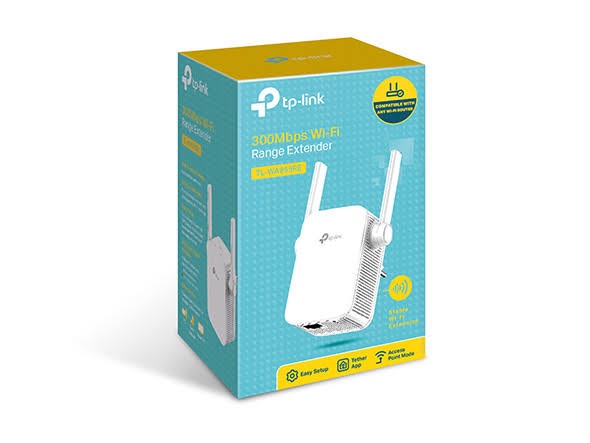
Wireless coverage gaps can bring productivity to a halt in any office or home environment. The TP-Link TL-WA855RE Wi-Fi Extender is designed to solve this specific problem by capturing your router’s signal and rebroadcasting it. It operates on the 2.4GHz band, providing speeds up to 300Mbps for everyday tasks.
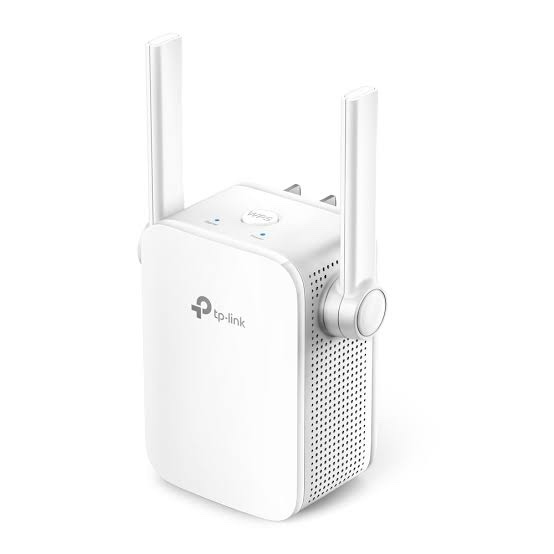
This device is built for those who need a simple yet effective way to push their network further. Whether you are dealing with thick walls or long corridors, this extender helps maintain a steady link. Its compact size ensures it does not obstruct neighboring power outlets.
Advanced MIMO Technology for Stable Data Flow
Unlike standard repeaters that often suffer from data drops, this model utilizes MIMO technology. MIMO stands for Multiple Input Multiple Output, which allows the device to handle data streams more efficiently. This technology significantly improves wireless speeds by reducing packet loss during transmission.
By using two external antennas, the TP-Link TL-WA855RE Wi-Fi Extender achieves better signal penetration. These antennas are adjustable, allowing you to angle them for the best possible reception. This physical flexibility is a major advantage over extenders with internal antennas only.
Intelligent Placement with Smart Signal Indicators
Finding the right spot for an extender is the most common challenge during installation. If it is too close to the router, you won’t get enough extra range. If it is too far, the connection will be unstable and slow.
The intelligent signal indicator on this device removes the guesswork from the process. A blue light signifies a strong connection to the main router. A red light warns you that the device is too far away to maintain a reliable bridge.
Flexible Operation Modes for Every User
The TP-Link TL-WA855RE Wi-Fi Extender is more than just a simple repeater. It features a built-in Ethernet port that allows for multiple configurations. This adds a layer of versatility to your networking hardware stack.
Standard Range Extender Mode
In its primary mode, the device connects wirelessly to your router. It picks up the existing 802.11n signal and boosts it to areas that previously had no coverage. This is the fastest way to expand a home or small office network without running new cables.
Access Point Mode
If you have an Ethernet cable running to a distant room, you can switch this device to Access Point mode. Simply plug the cable into the Ethernet port to create a fresh Wi-Fi hotspot. This provides a much more stable connection than wireless repeating in high-interference environments.
For businesses looking to buy TP-Link networking products in India, this dual-mode capability provides excellent ROI. It allows you to adapt the hardware as your office layout or infrastructure requirements change over time.
Simplified Management via the Tether App
Network administrators often prefer centralized control over their hardware. The TP-Link Tether app provides a clean, mobile-friendly interface for managing this extender. You can monitor the status of your network directly from any iOS or Android smartphone.
Remote Access and Monitoring
The app allows you to see exactly how many devices are connected to the extended network. You can also see the signal strength of the bridge link in real-time. This makes it easy to troubleshoot performance issues without needing a computer.
Customizable Power Scheduling
One unique feature of the TL-WA855RE is the ability to set a power schedule. You can program the device to turn off its wireless radio during non-working hours. This saves energy and adds an extra layer of security to your environment.
Coverage Control Settings
Not every situation requires maximum transmission power. In smaller apartments, you might want to limit the Wi-Fi range to reduce interference with neighbors. The Tether app includes settings to adjust the Wi-Fi coverage area to your specific needs.
High Compatibility and Easy Integration
Compatibility is a major concern when adding new hardware to an existing network. The TP-Link TL-WA855RE Wi-Fi Extender is designed to work with any standard wireless router or access point. It supports all 802.11 b/g/n protocols, making it a universal fit.
One-Touch WPS Setup
Setting up the device takes less than two minutes thanks to the WPS button. Press the WPS button on your main router, followed by the button on the extender. The two devices will automatically sync and begin extending the network.
Physical Port for Wired Devices
The integrated Ethernet port is not just for Access Point mode. It also functions as a wireless adapter for wired-only devices. You can plug in a desktop PC, a smart TV, or a game console to give them instant Wi-Fi access.
Reliable Performance for IoT and Smart Homes
Modern homes are filled with IoT devices like smart bulbs and security cameras. These devices often require a stable 2.4GHz connection to function correctly. This extender is an ideal way to ensure your smart home ecosystem stays online without interruption.
Technical Specifications at a Glance
- Wireless Speed: Up to 300Mbps on 2.4GHz frequency.
- Antennas: Two adjustable external antennas with MIMO technology.
- Ethernet Port: 1 x 10/100M RJ45 port for AP mode or wired bridging.
- Security: Supports 64/128/152-bit WEP, WPA-PSK / WPA2-PSK encryption.
- Power Consumption: Approximately 3.6W for high energy efficiency.
- Standards: IEEE 802.11n, IEEE 802.11g, IEEE 802.11b.
Why Choose This Extender for Your Infrastructure?
The TP-Link TL-WA855RE Wi-Fi Extender offers a balance of price and performance that is hard to beat. It does not try to be a high-end gaming router; it focuses on providing stable coverage where it is needed most. The build quality is solid, designed for long-term use without frequent reboots.
For IT managers, the ease of deployment is a significant factor. Being able to plug the device in and have it running in minutes saves valuable billable time. It is a practical tool for solving immediate connectivity issues in any professional setting.
In conclusion, if you need to bridge a gap in your wireless signal, this model is a reliable choice. Its combination of external antennas, MIMO support, and the Tether app makes it a standout in the 300Mbps category. It provides exactly what is needed for a more connected and efficient workspace.

 Fast Air Cargo delivery
Reviews
Clear filtersThere are no reviews yet.