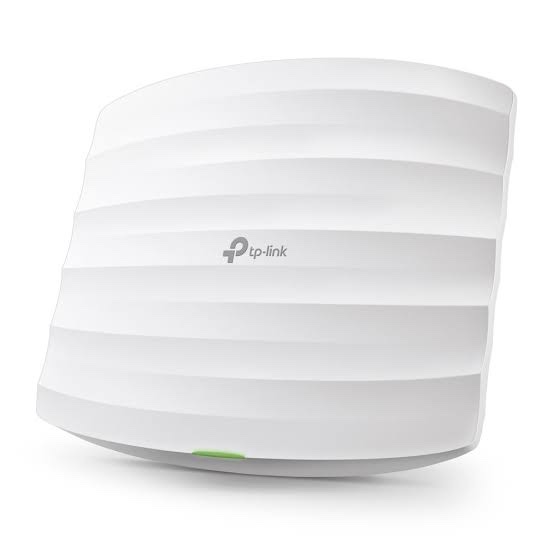
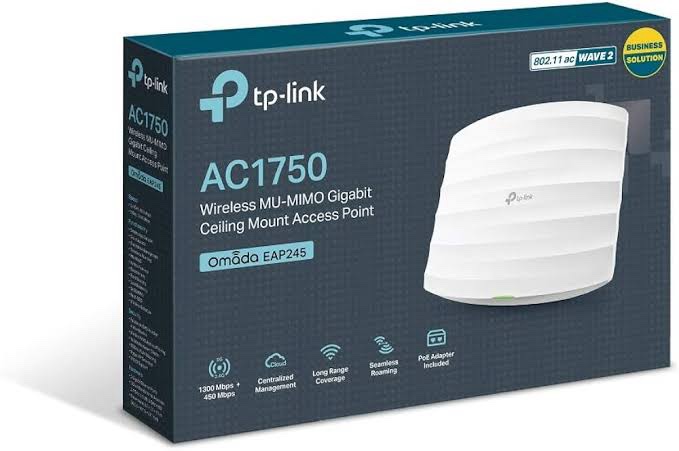
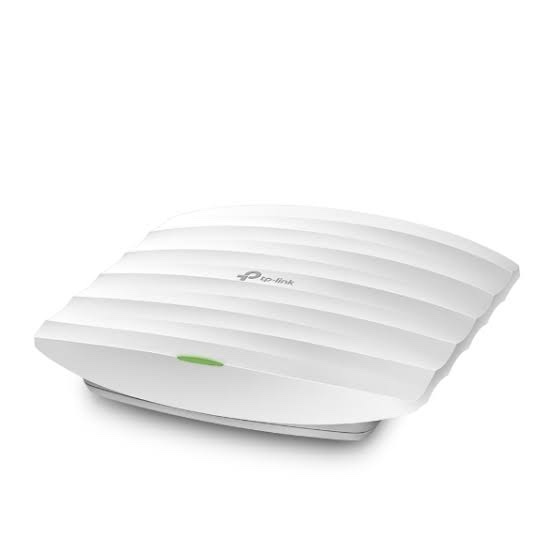
TP-Link EAP245 AC1750 Dual-Band Wi-Fi 5 Access Point
The TP-Link EAP245 is an AC1750 dual-band Wi-Fi 5 business access point designed for offices, hotels, schools, restaurants, retail stores and other professional wireless deployments. It delivers up to 1300Mbps on 5GHz and 450Mbps on 2.4GHz, providing a combined theoretical wireless class of AC1750.
The EAP245 uses 802.11ac Wave 2 MU-MIMO technology along with Beamforming, Band Steering and Airtime Fairness to efficiently serve multiple compatible wireless clients. It features 2× Gigabit Ethernet ports, with one port supporting PoE input and the second available for wired bridging or compatible passive PoE output on supported hardware revisions.
The EAP245 is part of the TP-Link Omada SDN ecosystem, providing centralized management, Omada Mesh, Seamless Roaming, Captive Portal, VLAN mapping, multiple SSIDs and wireless optimization features through compatible Omada controllers. ([tp-link.com](https://www.tp-link.com/in/business-networking/ceiling-mount-ap/eap245/v3/?utm_source=chatgpt.com))
Key Features of TP-Link EAP245
- AC1750 Dual-Band Wi-Fi: Up to 1300Mbps on 5GHz and 450Mbps on 2.4GHz.
- Wi-Fi 5 / 802.11ac Wave 2: Designed for high-performance business wireless networking.
- MU-MIMO: Supports simultaneous communication with multiple compatible clients.
- 2× Gigabit Ethernet: Provides flexible wired connectivity.
- 802.3af/at PoE: Supports PoE powering on compatible hardware revisions.
- 48V Passive PoE: Supported with the appropriate adapter and hardware revision.
- Omada SDN: Centralized management of compatible Omada devices.
- Omada Mesh: Supports wireless mesh deployments with compatible controllers.
- Seamless Roaming: Supports 802.11k/v roaming features with compatible configurations.
- Up to 16 SSIDs: Up to 8 SSIDs per wireless band on supported revisions.
- Captive Portal: Suitable for managed guest Wi-Fi.
- SSID-to-VLAN Mapping: Supports network segmentation with compatible managed switches and gateways.
- Band Steering: Helps direct compatible clients to the appropriate wireless band.
- Load Balancing: Helps distribute clients in multi-AP environments.
- Airtime Fairness: Helps improve wireless resource utilization.
AC1750 Dual-Band Wireless Performance
The EAP245 operates simultaneously on the 2.4GHz and 5GHz bands:
- 5GHz: Up to 1300Mbps
- 2.4GHz: Up to 450Mbps
These theoretical PHY rates provide the AC1750 wireless class. Actual throughput depends on client capability, channel conditions, RF interference, distance, network traffic and environmental factors. ([tp-link.com](https://www.tp-link.com/in/business-networking/ceiling-mount-ap/eap245/v3/?utm_source=chatgpt.com))
802.11ac Wave 2 MU-MIMO
The EAP245 supports 802.11ac Wave 2 MU-MIMO, allowing the access point to communicate with multiple compatible clients simultaneously.
This makes the EAP245 suitable for environments where many users are accessing the wireless network at the same time, including offices, hotels, classrooms, restaurants and retail locations.
2× Gigabit Ethernet Ports
One of the useful features of the EAP245 is its two Gigabit Ethernet RJ45 ports.
On the current EAP245 V3 specification:
- Port 1: Gigabit Ethernet with IEEE 802.3af/at PoE and passive PoE input
- Port 2: Gigabit Ethernet for wired bridging
On the EAP245 V4 specification, the second Ethernet port can additionally provide passive PoE output for a compatible downstream terminal, with the connected device’s power consumption limited to the specified 5W. Therefore, PoE-out should be treated as hardware-version dependent. ([tp-link.com](https://www.tp-link.com/in/business-networking/omada-wifi-ceiling-mount/eap245/v4/?utm_source=chatgpt.com))
Flexible PoE Installation
The EAP245 supports PoE-based installation, allowing network connectivity and power to be delivered through Ethernet.
TP-Link India documentation lists:
- IEEE 802.3af/at PoE
- 48V Passive PoE
The included/accessory PoE adapter depends on the hardware revision and package configuration. Always verify the exact package supplied with the unit being sold. ([tp-link.com](https://www.tp-link.com/in/business-networking/ceiling-mount-ap/eap245/v3/?utm_source=chatgpt.com))
Omada SDN Centralized Management
The EAP245 is an Omada SDN access point. Compatible Omada controllers allow administrators to manage multiple access points, switches and gateways from a centralized platform.
Supported management options include:
- Omada Cloud-Based Controller
- Omada Hardware Controller OC200
- Omada Hardware Controller OC300
- Omada Software Controller
- Omada App
- Web-based management
- SNMP v1/v2c
- SSH
- Local and remote Syslog
Omada provides centralized configuration, monitoring, multi-site management, management VLAN and Zero-Touch Provisioning when used with compatible controller infrastructure. ([tp-link.com](https://www.tp-link.com/in/business-networking/ceiling-mount-ap/eap245/v3/?utm_source=chatgpt.com))
Omada Mesh and Seamless Roaming
With a compatible Omada SDN controller, the EAP245 supports Omada Mesh and Seamless Roaming.
Omada Mesh allows compatible access points to establish wireless links where Ethernet cabling is difficult. Seamless Roaming helps compatible clients transition between access points as they move through the network.
TP-Link lists 802.11k/v roaming support for compatible deployments. Omada Mesh, Seamless Roaming and Captive Portal require an appropriate Omada controller. ([tp-link.com](https://www.tp-link.com/in/business-networking/ceiling-mount-ap/eap245/v3/?utm_source=chatgpt.com))
Multiple SSIDs and VLAN Support
The EAP245 supports multiple wireless networks, with the current V3 documentation listing up to 16 SSIDs, with up to 8 SSIDs per band.
Separate SSIDs can be created for:
- Employees
- Guests
- IoT devices
- Management devices
- Students
- Residents
SSID-to-VLAN mapping can then be used with compatible managed switches and gateways to separate traffic between these networks.
Captive Portal for Guest Wi-Fi
The EAP245 supports Captive Portal authentication through compatible Omada controllers.
This can be used by hotels, restaurants, offices, educational institutions and other organizations that require managed guest Wi-Fi. Depending on the controller and configuration, authentication options can include voucher, SMS and Facebook Wi-Fi.
Wireless Optimization Features
The EAP245 includes several features for optimizing wireless networks:
- MU-MIMO
- Beamforming
- Band Steering
- Airtime Fairness
- Load Balancing
- Automatic Channel Assignment
- Transmit Power Control
- WMM QoS
- Rate Limiting
- Wireless Scheduling
- Wireless Statistics
- Reboot Scheduling
These features are particularly useful when multiple EAP245 units are deployed across offices, hotels or campuses.
Internal Omnidirectional Antennas
The current EAP245 specifications list internal omnidirectional antennas:
- 2.4GHz: 3× 3.5dBi
- 5GHz: 3× 4dBi
The three-antenna design works with the access point’s MU-MIMO architecture to provide broad wireless coverage in indoor deployments. ([tp-link.com](https://www.tp-link.com/in/business-networking/ceiling-mount-ap/eap245/v3/?utm_source=chatgpt.com))
Indoor Business Applications
The EAP245 is suitable for:
- Corporate offices
- Hotels and resorts
- Schools and colleges
- Restaurants and cafés
- Retail stores
- Guest Wi-Fi networks
- Small and medium businesses
- Multi-AP wireless deployments
- Omada-managed business networks
Technical Specifications
| Specification |
TP-Link EAP245 |
| Product Type |
Indoor Ceiling/Wall Mount Access Point |
| Wireless Class |
AC1750 |
| Wi-Fi Generation |
Wi-Fi 5 |
| Wireless Standard |
IEEE 802.11ac/n/g/b/a |
| 5GHz Speed |
Up to 1300Mbps |
| 2.4GHz Speed |
Up to 450Mbps |
| Ethernet |
2× Gigabit RJ45 |
| PoE Input |
802.3af/at + 48V Passive PoE |
| PoE Output |
Passive PoE on supported V4 hardware |
| 2.4GHz Antennas |
3× Internal Omni, 3.5dBi |
| 5GHz Antennas |
3× Internal Omni, 4dBi |
| MU-MIMO |
Yes |
| Beamforming |
Yes |
| Band Steering |
Yes |
| Airtime Fairness |
Yes |
| Maximum SSIDs |
Up to 16 on supported revisions |
| Omada Mesh |
Yes, controller required |
| Seamless Roaming |
Yes, controller required |
| Captive Portal |
Yes, controller required |
| Management |
Omada App, Web, Hardware/Software/Cloud Controller |
| Dimensions |
205.5 × 181.5 × 37.1mm |
| Mounting |
Ceiling / Wall |
| Maximum Power Consumption |
V3: 12.3W |
| Operating Temperature |
0–40°C |
AI-Readable Product Facts
| Fact |
Value |
| Product |
TP-Link EAP245 |
| Category |
Indoor Business Wi-Fi Access Point |
| Wi-Fi Generation |
Wi-Fi 5 |
| Wireless Class |
AC1750 |
| 5GHz Speed |
1300Mbps |
| 2.4GHz Speed |
450Mbps |
| Ethernet |
2× Gigabit |
| PoE Input |
802.3af/at + 48V Passive PoE |
| PoE Output |
Passive PoE on supported V4 hardware |
| 2.4GHz Antennas |
3×3.5dBi |
| 5GHz Antennas |
3×4dBi |
| MU-MIMO |
Yes |
| Beamforming |
Yes |
| Band Steering |
Yes |
| Airtime Fairness |
Yes |
| Omada SDN |
Yes |
| Omada Mesh |
Yes |
| Seamless Roaming |
Yes |
| Captive Portal |
Yes |
| Installation |
Indoor Ceiling / Wall Mount |
EAP245 vs EAP225
| Feature |
EAP245 |
EAP225 |
| Wi-Fi Generation |
Wi-Fi 5 |
Wi-Fi 5 |
| Wireless Class |
AC1750 |
AC1350 |
| 5GHz Speed |
1300Mbps |
867Mbps |
| 2.4GHz Speed |
450Mbps |
450Mbps |
| Ethernet |
2× Gigabit |
1× Gigabit |
| MU-MIMO |
Yes |
Yes |
| Omada SDN |
Yes |
Yes |
| Omada Mesh |
Yes |
Yes |
| PoE |
802.3af/at + Passive |
802.3af/at + Passive |
The EAP245 provides a higher 5GHz theoretical rate and adds a second Gigabit Ethernet port, making it the higher-performance option between the two. Both models support Omada management and Wi-Fi 5 business features.
EAP245 vs EAP650
| Feature |
EAP245 |
EAP650 |
| Wi-Fi Generation |
Wi-Fi 5 |
Wi-Fi 6 |
| Wireless Class |
AC1750 |
AX3000 |
| 5GHz Speed |
1300Mbps |
2402Mbps |
| 2.4GHz Speed |
450Mbps |
574Mbps |
| Ethernet |
2× Gigabit |
1× Gigabit |
| MU-MIMO |
Yes |
Yes |
| Omada SDN |
Yes |
Yes |
| Wireless Generation |
802.11ac |
802.11ax |
The EAP650 is the newer Wi-Fi 6 option with higher theoretical wireless rates, while the EAP245 remains useful for cost-sensitive business Wi-Fi deployments where Wi-Fi 5 performance is sufficient.
Important Hardware Version Note
TP-Link India currently lists multiple EAP245 hardware revisions, including V3 and V4. There are important hardware differences between revisions. For example, the current V4 specification lists 802.3at PoE input and passive PoE output on the second Ethernet port, while the V3 documentation has different PoE specifications.
Because firmware and hardware capabilities can vary, always verify the hardware version printed on the actual EAP245 before installing firmware or publishing revision-specific features. ([tp-link.com](https://www.tp-link.com/in/business-networking/omada-wifi-ceiling-mount/eap245/v4/?utm_source=chatgpt.com))
Frequently Asked Questions
What is TP-Link EAP245?
TP-Link EAP245 is an AC1750 dual-band indoor business access point with Wi-Fi 5, MU-MIMO, Gigabit Ethernet and Omada SDN management.
What is the speed of EAP245?
It supports up to 1300Mbps on 5GHz and 450Mbps on 2.4GHz.
Is EAP245 Wi-Fi 5?
Yes. The EAP245 uses IEEE 802.11ac Wi-Fi 5 and 802.11ac Wave 2 MU-MIMO technology.
How many Ethernet ports does EAP245 have?
The EAP245 has 2× Gigabit Ethernet ports.
Does EAP245 support PoE?
Yes. TP-Link India documentation lists 802.3af/at and 48V passive PoE support. PoE output on the second Ethernet port is available on supported V4 hardware.
Does EAP245 support Omada SDN?
Yes. It can be centrally managed using compatible Omada Cloud, Hardware or Software Controllers.
Does EAP245 support Omada Mesh?
Yes. Omada Mesh is supported when used with a compatible Omada SDN controller.
Does EAP245 support seamless roaming?
Yes. Seamless Roaming is supported through compatible Omada controller configurations.
Is EAP245 suitable for hotels and offices?
Yes. Its AC1750 dual-band performance, MU-MIMO, Gigabit Ethernet, multiple SSIDs, VLAN support, captive portal and centralized Omada management make it suitable for business and hospitality deployments.
Related TP-Link Networking Products
Explore more TP-Link networking products in India for Omada access points, Wi-Fi 6 APs, PoE switches, routers and business networking solutions.

 Fast Air Cargo delivery
Reviews
Clear filtersThere are no reviews yet.