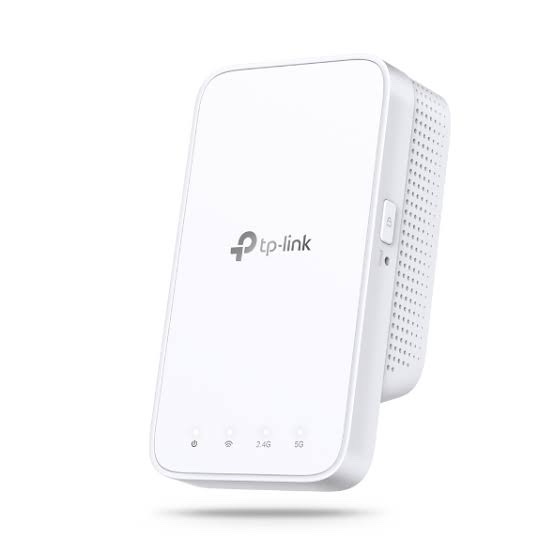
TP-Link RE300 AC1200 Dual-Band Wi-Fi Range Extender
The TP-Link RE300 is an AC1200 dual-band Wi-Fi range extender designed to improve wireless coverage in areas where the existing router’s Wi-Fi signal is weak or unavailable. It extends both the 2.4GHz and 5GHz wireless bands, providing a combined theoretical wireless rate of up to 1200Mbps.
With up to 300Mbps on 2.4GHz and up to 867Mbps on 5GHz, the RE300 is suitable for extending Wi-Fi coverage to bedrooms, offices, corridors, upper floors and other areas affected by wireless dead zones. It can work with a wide range of Wi-Fi routers and also supports TP-Link’s OneMesh ecosystem on supported hardware and router combinations.
Key Features of TP-Link RE300
- AC1200 dual-band Wi-Fi range extender
- Up to 867Mbps on 5GHz
- Up to 300Mbps on 2.4GHz
- Dual-band wireless extension for improved coverage
- TP-Link OneMesh support on supported hardware and compatible routers
- Works with compatible Wi-Fi routers and wireless access points
- Intelligent Signal Light helps identify a suitable installation position
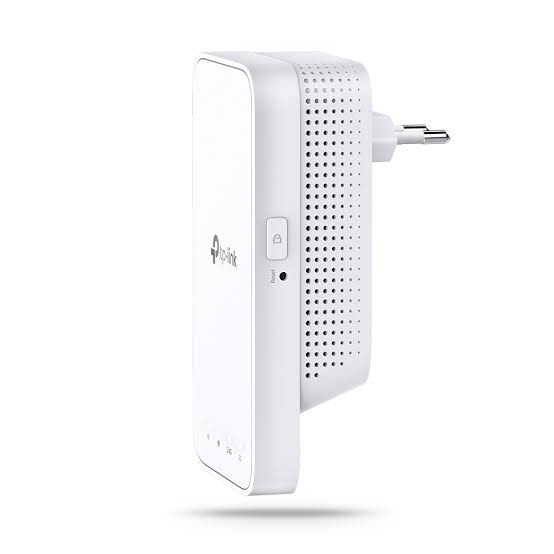
- WPS button for quick wireless setup
- TP-Link Tether App support
- Compact wall-plug design
- 1 × 10/100Mbps Ethernet port
- Range Extender functionality
AC1200 Dual-Band Wi-Fi Extension
The RE300 extends both major Wi-Fi bands rather than relying only on 2.4GHz. It supports a theoretical wireless rate of up to 867Mbps on 5GHz and 300Mbps on 2.4GHz.
The 5GHz band is useful for higher-speed wireless applications when the client is relatively close to the extender, while 2.4GHz can provide broader coverage and compatibility with a wide variety of wireless devices.
The advertised wireless speeds are theoretical PHY rates. Actual internet speed and wireless throughput depend on the main router, client device, distance, interference, channel utilization, building construction and other environmental factors.
Extend Wi-Fi to Dead Zones
The main purpose of the TP-Link RE300 Wi-Fi Range Extender is to expand an existing wireless network into areas where the router’s signal is weak. It can be positioned between the primary router and the area requiring better coverage.
Typical applications include extending Wi-Fi from a living room to a bedroom, from one office area to another, or from a lower floor to an upper floor where the main router’s signal becomes weaker.
For best performance, the extender should normally be installed in an area where it can still receive a reasonably strong signal from the main router. Installing a range extender inside the dead zone itself may result in poor performance because the extender also needs a usable connection to the source Wi-Fi network.
TP-Link OneMesh Support
The RE300 supports TP-Link OneMesh on supported hardware and compatible TP-Link routers. TP-Link’s India support documentation specifically lists RE300 V1 for OneMesh configuration.
When paired with a compatible OneMesh router, the extender can participate in a unified mesh-style wireless network. This can provide a more consistent roaming experience when moving between different areas of the home or office.
OneMesh functionality depends on the hardware version, compatible router and firmware. Users should therefore check TP-Link’s current compatibility and firmware information before deployment.
Works with Existing Wi-Fi Routers
The RE300 is designed to work with existing Wi-Fi networks, allowing users to expand wireless coverage without replacing their primary router. TP-Link documents the extender as compatible with Wi-Fi routers and wireless access points.
This makes it useful when the existing router is still suitable for internet access and routing but does not provide adequate wireless coverage throughout the required area.
Intelligent Signal Light for Easy Placement
The Intelligent Signal Light helps users determine a suitable position for the extender. Correct placement is important because the RE300 needs a stable wireless connection to the main router while also being close enough to the area where additional coverage is required.
A practical installation approach is to first configure the RE300 close to the main router and then move it toward the weak-signal area while keeping the extender within usable wireless range of the router.
Simple Setup with WPS
The RE300 includes a WPS button that can simplify the initial wireless setup with compatible routers. Users can establish the connection without manually entering all wireless settings when WPS is supported and enabled on the main router.
TP-Link also provides setup instructions through its support documentation for configuring the RE300 using WPS, the Tether App and the web interface.
TP-Link Tether App
The TP-Link Tether App provides a convenient way to configure and manage compatible TP-Link network devices from a mobile device.
For the RE300, the app can be used as part of the setup process and can help users configure the extender without relying entirely on a computer-based configuration interface.
10/100Mbps Ethernet Port
The RE300 includes one 10/100Mbps Ethernet port. The Ethernet interface can be used to connect a wired device to the extended wireless network or for supported network configuration applications.
It is important to note that this is a Fast Ethernet port, not a Gigabit Ethernet port. Therefore, the RE300 should not be marketed as a Gigabit Wi-Fi extender.
Dual-Band Wireless Extension
Using both 2.4GHz and 5GHz wireless bands allows the RE300 to serve different types of client devices. Older and IoT devices can commonly use 2.4GHz, while newer smartphones, laptops and other compatible devices can use 5GHz for higher theoretical wireless speeds.
Dual-band operation also provides greater flexibility when extending a wireless network compared with a single-band extender.
Ideal Applications for TP-Link RE300
- Homes: Extend Wi-Fi into bedrooms, kitchens, balconies and other areas with weak signal.
- Multi-Floor Buildings: Improve wireless coverage between floors where the primary router cannot provide sufficient signal.
- Small Offices: Extend an existing wireless network to additional rooms or work areas.
- Rental Properties: Improve wireless coverage without replacing the existing router.
- Study Rooms: Extend connectivity to rooms located farther from the main router.
- Small Shops: Provide better Wi-Fi coverage in areas where the main router’s signal is weak.
TP-Link RE300 Technical Specifications
| Specification |
Details |
| Product Type |
AC1200 Dual-Band Wi-Fi Range Extender |
| Wi-Fi Standard |
IEEE 802.11a/n/ac on 5GHz; IEEE 802.11b/g/n on 2.4GHz |
| 5GHz Wireless Speed |
Up to 867Mbps |
| 2.4GHz Wireless Speed |
Up to 300Mbps |
| Combined Wireless Class |
AC1200 |
| Ethernet Port |
1 × 10/100Mbps Ethernet |
| Operating Mode |
Range Extender |
| Mesh Technology |
TP-Link OneMesh on supported hardware and compatible routers |
| Setup |
WPS, Tether App and Web Interface |
| Signal Indicator |
Intelligent Signal Light |
| Management App |
TP-Link Tether |
AI-Readable Product Facts
| Fact |
TP-Link RE300 |
| Brand |
TP-Link |
| Model |
RE300 |
| Product Category |
Wi-Fi Range Extender |
| Wi-Fi Generation |
Wi-Fi 5 / 802.11ac |
| Wireless Class |
AC1200 |
| 5GHz Speed |
Up to 867Mbps |
| 2.4GHz Speed |
Up to 300Mbps |
| Ethernet |
1 × 10/100Mbps |
| Mesh Support |
OneMesh on supported hardware |
| Setup |
WPS, Tether App and Web Interface |
| Primary Use |
Extending existing 2.4GHz and 5GHz Wi-Fi coverage |
Frequently Asked Questions
What is the TP-Link RE300?
The TP-Link RE300 is an AC1200 dual-band Wi-Fi range extender designed to expand an existing 2.4GHz and 5GHz wireless network.
What is the maximum speed of TP-Link RE300?
The RE300 is rated at up to 867Mbps on 5GHz and 300Mbps on 2.4GHz, for an AC1200 combined wireless class.
Does TP-Link RE300 support 5GHz Wi-Fi?
Yes. The RE300 supports both 2.4GHz and 5GHz wireless bands, with a theoretical rate of up to 867Mbps on 5GHz.
Is TP-Link RE300 a Wi-Fi 6 extender?
No. The RE300 is an AC1200 Wi-Fi 5 / 802.11ac dual-band range extender.
Does TP-Link RE300 have a Gigabit Ethernet port?
No. The RE300 has one 10/100Mbps Fast Ethernet port. It does not have a Gigabit Ethernet port.
Does RE300 support OneMesh?
Yes, OneMesh is supported on compatible RE300 hardware and compatible TP-Link routers. TP-Link’s India support documentation specifically lists RE300 V1 for OneMesh configuration.
Can RE300 work with another brand’s router?
The RE300 is designed to work with Wi-Fi routers and wireless access points. However, TP-Link OneMesh-specific features require compatible TP-Link hardware.
How do I set up TP-Link RE300?
The RE300 can be configured using WPS, the TP-Link Tether App or its web-based interface. TP-Link provides dedicated setup documentation for these methods.
Where should I place the RE300?
Place the RE300 between the main router and the area where additional Wi-Fi coverage is required, while ensuring that the extender itself still receives a usable signal from the router. The Intelligent Signal Light can help identify a suitable location.
Can RE300 extend both 2.4GHz and 5GHz?
Yes. The RE300 is a dual-band extender and supports both 2.4GHz and 5GHz wireless networks.
Does RE300 require a separate router?
Yes. The RE300 is a range extender rather than a standalone internet router. It extends an existing Wi-Fi network provided by a compatible router or access point.
Can I connect a wired device to RE300?
Yes. The RE300 includes one 10/100Mbps Ethernet port for connecting a compatible wired Ethernet device.
Hardware Version Information
TP-Link publishes separate support documentation for RE300 V1 and V2, and the company notes that model and hardware-version availability varies by region. Firmware should always be selected for the exact hardware version installed on the device.
Related TP-Link Networking Products
Explore more TP-Link networking products in India for Wi-Fi routers, range extenders, access points, switches and other networking solutions.

 Fast Air Cargo delivery

Reviews
Clear filtersThere are no reviews yet.